
Read, Share, and Update are not the same thing
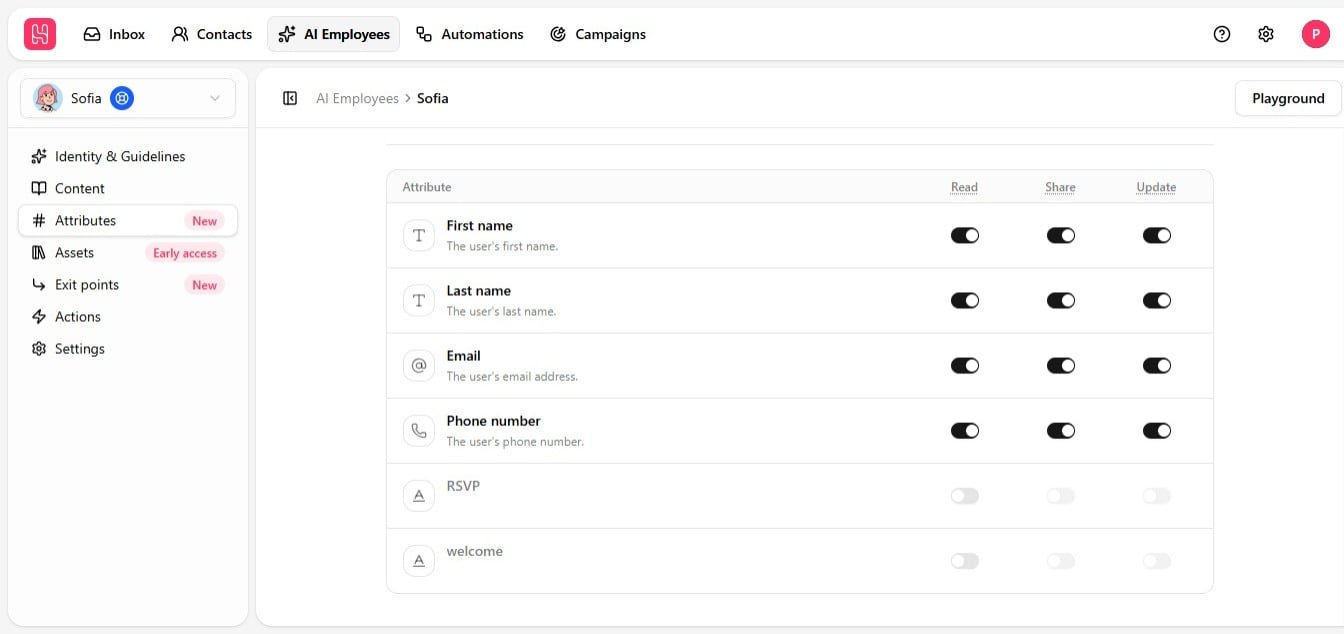
Why Share matters for privacy
Say you track a contact’s plan tier, lead status, or an internal pricing note as an attribute. You can leave Read on — so the employee can use that value in its own logic, deciding how to route a conversation, for example — while leaving Share off, so it never says the value out loud. If a contact asks directly, “what plan am I on?”, and Share is off, the employee says it does not have that information, even though it actually knows the value internally. That is by design — it protects sensitive data even when the contact already suspects the attribute exists and asks for it directly.What Update is for
Update lets the employee capture and save new information as the conversation happens — a name, an email, a phone number, or any custom attribute, saved straight to the contact record without anyone entering it manually later. This is what makes an employee genuinely useful for lead qualification, not just answering questions. This is especially valuable on channels like Live Chat, where a visitor starts out anonymous. Give the employee Update access to name, email, and phone number, and it can turn an anonymous chat into a fully identified contact over the course of a conversation. See Update contact fields.Setting this up
The four system attributes — first name, last name, email, and phone number — are enabled with Read by default. Add custom attributes from your workspace settings as needed, with a short description if the name alone is not self-explanatory; that description is what helps the employee understand when and how to use it.
See Read contact fields and Update contact fields for step-by-step setup.