> ## Documentation Index
> Fetch the complete documentation index at: https://docs.heyy.io/llms.txt
> Use this file to discover all available pages before exploring further.
# Introduction
> Use webhooks to get real-time notifications on events happening across your Heyy workspace.
Webhooks allow you to listen to real-time events happening across your Heyy workspace. With webhooks, you can build custom integrations with Heyy, such as:
* Syncing [message events](/webhooks/event-types) to your CRM or data warehouse in real time
* Triggering downstream workflows when a [`message.received`](/webhooks/events/message-received) event arrives
* Forwarding delivery status updates from [`message.updated`](/webhooks/events/message-updated) to your own systems
* Connecting Heyy to tools like Zapier, Make, or n8n through your webhook endpoint
Heyy currently sends webhooks for message events only. See [Event types](/webhooks/event-types) for the list of supported events and payloads.
In this guide, we'll show you how to configure webhooks for your Heyy workspace and where to find the events you can listen to.
## Creating a webhook
To create a webhook for your Heyy workspace, follow these steps:
Navigate to the [**Webhooks** settings page](https://app.heyy.io/settings/api-webhooks) in your Heyy workspace.
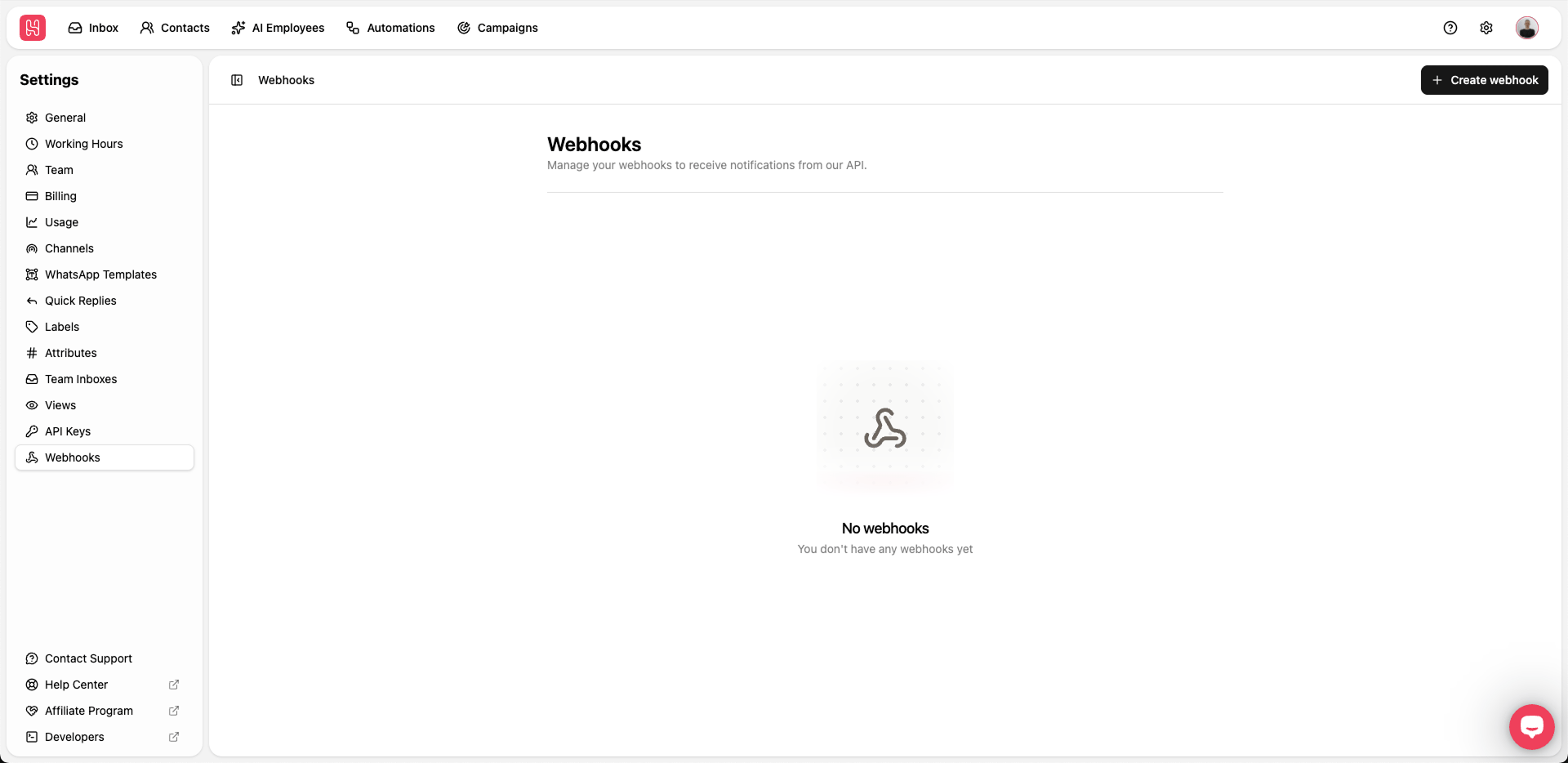 Click **Create webhook** to create a new webhook.
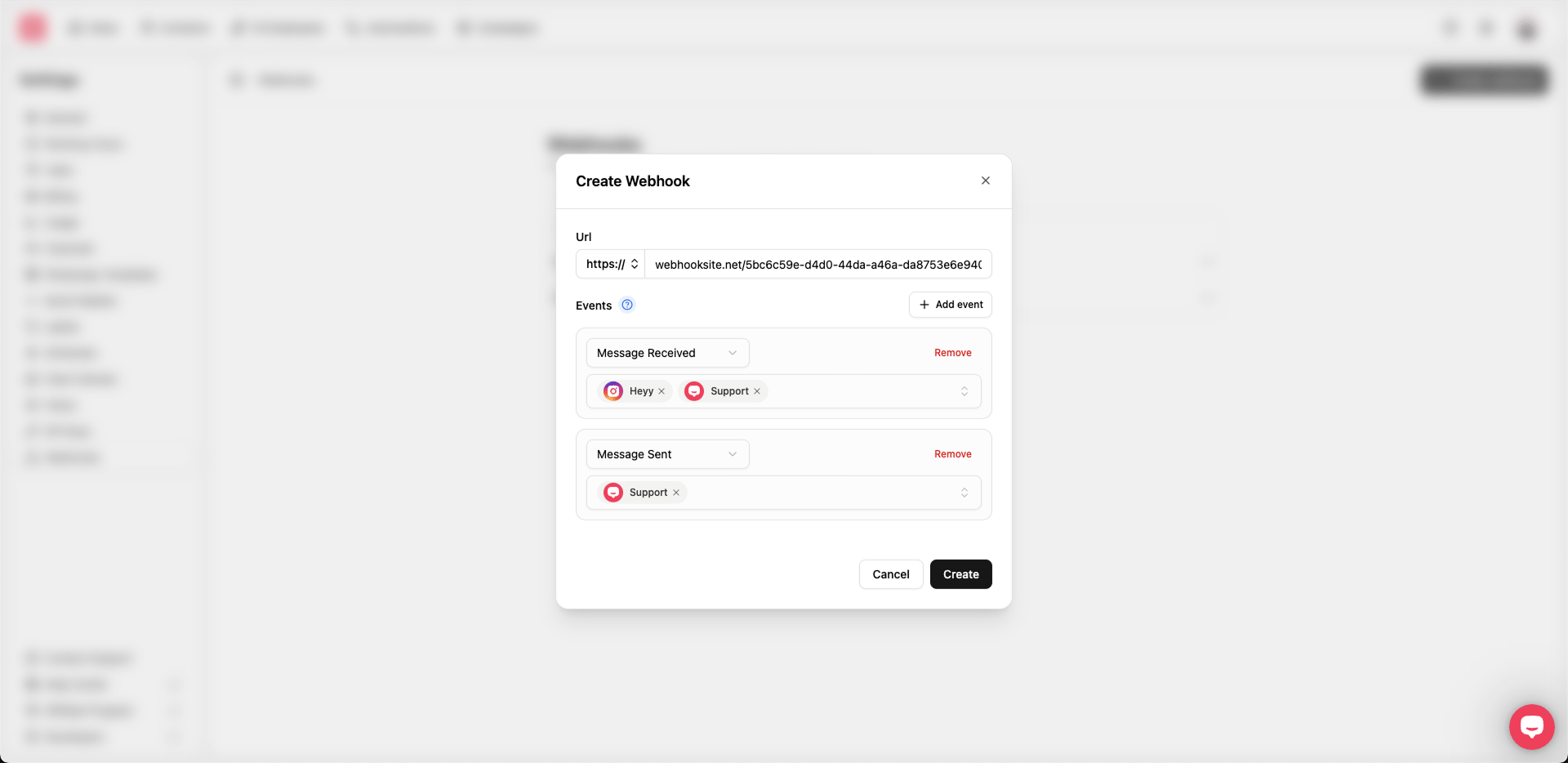 Fill in the required fields in the webhook creation form:
1. **URL** — The endpoint where Heyy should send webhook events (you can use [webhook.site](https://webhook.site/) to test your webhook).
2. **Events** — Configure which events this webhook listens to. Click **Add event** to add another row. Each event row has:
* **Event type** — `Message received`, `Message sent`, or `Message updated`. See [Event types](/webhooks/event-types) for payload details.
* **Channels** — Select one or more channels this event applies to. At least one channel is required per event.
Finally, click **Create** to save the configuration.
When updating a webhook, you can change the same fields. You can also create and manage webhooks through the **Manage webhooks** API endpoints in this tab.
## Retry behaviour
If your webhook endpoint does not respond with a success status code (2XX), Heyy retries the request so events are not lost. You can see retry attempts in your webhook event logs.
Webhooks are retried until they are successfully delivered, with exponential backoff to avoid overwhelming your endpoint (also known as the [thundering herd problem](https://en.wikipedia.org/wiki/Thundering_herd_problem)).
### Temporary disablement
If a webhook endpoint consistently fails, it will be automatically disabled after a series of failed attempts.
This prevents non-responsive endpoints from receiving retry attempts indefinitely.
You can re-enable a disabled webhook from the webhook details page in [**Settings → Webhooks**](https://app.heyy.io/settings/api-webhooks).
Fill in the required fields in the webhook creation form:
1. **URL** — The endpoint where Heyy should send webhook events (you can use [webhook.site](https://webhook.site/) to test your webhook).
2. **Events** — Configure which events this webhook listens to. Click **Add event** to add another row. Each event row has:
* **Event type** — `Message received`, `Message sent`, or `Message updated`. See [Event types](/webhooks/event-types) for payload details.
* **Channels** — Select one or more channels this event applies to. At least one channel is required per event.
Finally, click **Create** to save the configuration.
When updating a webhook, you can change the same fields. You can also create and manage webhooks through the **Manage webhooks** API endpoints in this tab.
## Retry behaviour
If your webhook endpoint does not respond with a success status code (2XX), Heyy retries the request so events are not lost. You can see retry attempts in your webhook event logs.
Webhooks are retried until they are successfully delivered, with exponential backoff to avoid overwhelming your endpoint (also known as the [thundering herd problem](https://en.wikipedia.org/wiki/Thundering_herd_problem)).
### Temporary disablement
If a webhook endpoint consistently fails, it will be automatically disabled after a series of failed attempts.
This prevents non-responsive endpoints from receiving retry attempts indefinitely.
You can re-enable a disabled webhook from the webhook details page in [**Settings → Webhooks**](https://app.heyy.io/settings/api-webhooks).