> ## Documentation Index
> Fetch the complete documentation index at: https://docs.heyy.io/llms.txt
> Use this file to discover all available pages before exploring further.
# Bulk actions
> Act on many conversations at once instead of one at a time.
**Bulk actions** apply the same change to every selected conversation in the [conversation list](/help/inbox/inbox-tour#the-conversation-list) at once — the fastest way to clear a backlog rather than working through it one [quick action](/help/inbox/find-and-organize/quick-actions) at a time.
## Apply a bulk action
1. Select the checkbox on each conversation you want to act on, or select all matching the current [filter](/help/inbox/find-and-organize/advanced-filters).
2. Choose an action from the bulk action bar that appears.
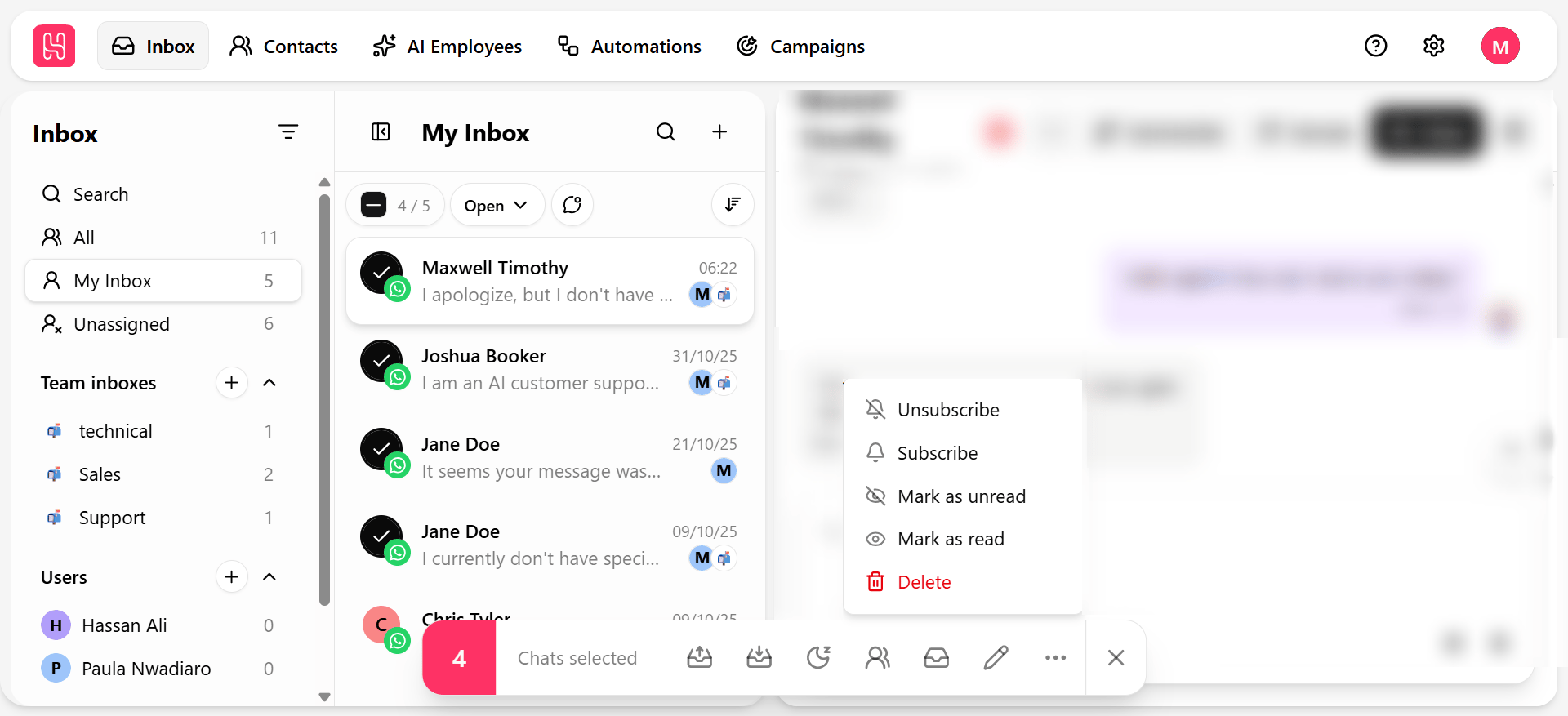 | Action | Effect |
| - | - |
| **Open** | Reopens closed or snoozed conversations. |
| **Close** | Marks all selected conversations resolved. |
| **Snooze** | Sets all selected conversations aside to resurface later. |
| **Assign to** | Hands every selected conversation to a chosen teammate. |
| **Move to** | Routes every selected conversation to a chosen [team inbox](/help/inbox/find-and-organize/team-and-user-inboxes). |
| **Mark read / unread** | Toggles read status across the selection. |
| **Subscribe / Unsubscribe** | Available from the **More** menu — updates [subscription status](/help/contacts/the-contact/contact-subscription) on the underlying contacts. |
Combine an [advanced filter](/help/inbox/find-and-organize/advanced-filters) with **select all** to bulk-close or bulk-reassign an entire backlog that matches a specific condition — for example, closing every conversation labeled "Resolved — awaiting confirmation" older than a week.
Bulk **Unsubscribe** updates the contact record, not just the conversation — it affects future campaigns and journeys for that contact, not only this chat. Confirm your selection before applying it at scale.
| Action | Effect |
| - | - |
| **Open** | Reopens closed or snoozed conversations. |
| **Close** | Marks all selected conversations resolved. |
| **Snooze** | Sets all selected conversations aside to resurface later. |
| **Assign to** | Hands every selected conversation to a chosen teammate. |
| **Move to** | Routes every selected conversation to a chosen [team inbox](/help/inbox/find-and-organize/team-and-user-inboxes). |
| **Mark read / unread** | Toggles read status across the selection. |
| **Subscribe / Unsubscribe** | Available from the **More** menu — updates [subscription status](/help/contacts/the-contact/contact-subscription) on the underlying contacts. |
Combine an [advanced filter](/help/inbox/find-and-organize/advanced-filters) with **select all** to bulk-close or bulk-reassign an entire backlog that matches a specific condition — for example, closing every conversation labeled "Resolved — awaiting confirmation" older than a week.
Bulk **Unsubscribe** updates the contact record, not just the conversation — it affects future campaigns and journeys for that contact, not only this chat. Confirm your selection before applying it at scale.