> ## Documentation Index
> Fetch the complete documentation index at: https://docs.heyy.io/llms.txt
> Use this file to discover all available pages before exploring further.
# Advanced filters
> Build precise, multi-condition filters on contact and chat data.
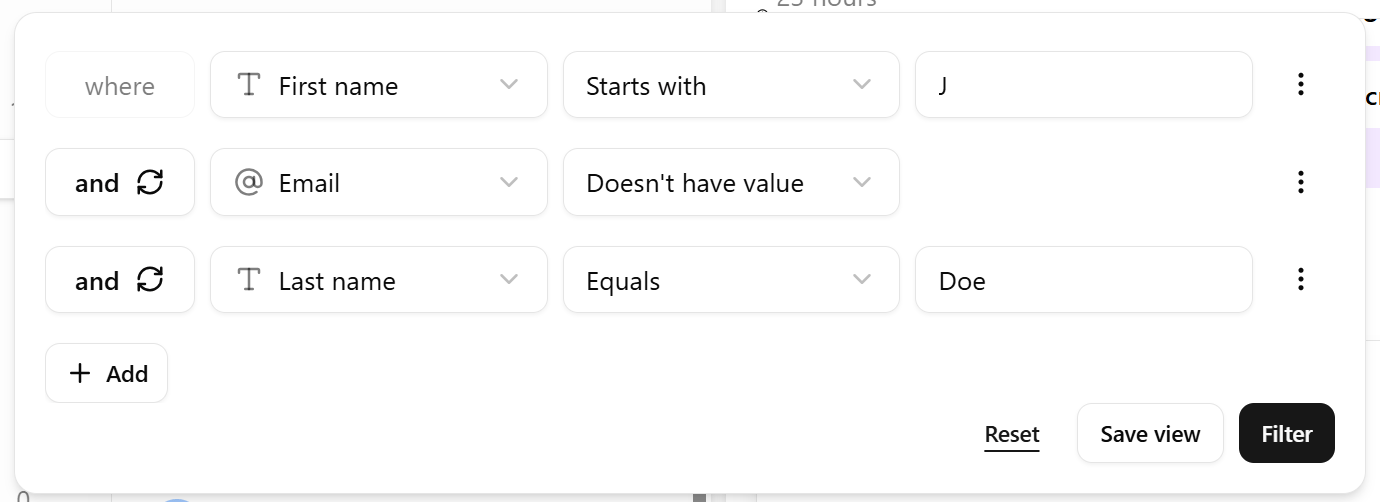
**Advanced filters** narrow the [conversation list](/help/inbox/inbox-tour#the-conversation-list) by the underlying contact and chat data, beyond what [Status and Sort](/help/inbox/find-and-organize/search-and-filter-chats) alone can do.
## Open the filter builder
Click the **Filter** (funnel) icon above the conversation list.
 ## What you can filter on
| Filter on | Example |
| ----------------------- | ------------------------------------------------------------------------------------------------------------------- |
| **Contact fields** | First name, last name, phone, email, or any custom attribute. |
| **Subscription status** | Subscribed vs. unsubscribed contacts — see [Contact subscription](/help/contacts/the-contact/contact-subscription). |
| **Labels** | Any [label](/help/contacts/mini-crm/labels) applied to the contact. |
| **Custom attributes** | Any additional field your workspace tracks. |
## Combining conditions
Choose **AND** or **OR** between conditions:
* **AND** narrows the result — every condition must match. Use it to combine, for example, *label is "VIP"* **and** *subscription status is subscribed*.
* **OR** broadens the result — any condition can match. Use it to combine, for example, *channel is WhatsApp* **or** *channel is Instagram*.
## Worked examples
| Goal | Filter |
| ------------------------------------ | ----------------------------------------------------------------------- |
| Reach only business contacts | Email does not contain `gmail.com` **and** does not contain `yahoo.com` |
| Find contacts missing a phone number | Phone number is empty |
| See only VIP conversations | Label is "VIP" |
Built a filter you'll want again? Save it as a [saved inbox view](/help/inbox/find-and-organize/saved-inbox-views) instead of reconstructing the same conditions from scratch every time.
## What you can filter on
| Filter on | Example |
| ----------------------- | ------------------------------------------------------------------------------------------------------------------- |
| **Contact fields** | First name, last name, phone, email, or any custom attribute. |
| **Subscription status** | Subscribed vs. unsubscribed contacts — see [Contact subscription](/help/contacts/the-contact/contact-subscription). |
| **Labels** | Any [label](/help/contacts/mini-crm/labels) applied to the contact. |
| **Custom attributes** | Any additional field your workspace tracks. |
## Combining conditions
Choose **AND** or **OR** between conditions:
* **AND** narrows the result — every condition must match. Use it to combine, for example, *label is "VIP"* **and** *subscription status is subscribed*.
* **OR** broadens the result — any condition can match. Use it to combine, for example, *channel is WhatsApp* **or** *channel is Instagram*.
## Worked examples
| Goal | Filter |
| ------------------------------------ | ----------------------------------------------------------------------- |
| Reach only business contacts | Email does not contain `gmail.com` **and** does not contain `yahoo.com` |
| Find contacts missing a phone number | Phone number is empty |
| See only VIP conversations | Label is "VIP" |
Built a filter you'll want again? Save it as a [saved inbox view](/help/inbox/find-and-organize/saved-inbox-views) instead of reconstructing the same conditions from scratch every time.