> ## Documentation Index
> Fetch the complete documentation index at: https://docs.heyy.io/llms.txt
> Use this file to discover all available pages before exploring further.
# Conversation window
> Why free-form replies stop working after a while on WhatsApp, Messenger, and Instagram — and how to fix it.
The **conversation window** (also called the reply window or messaging window) is a time limit on free-form messaging, set by the channel provider — Meta, for WhatsApp, Messenger, and Instagram — not something Heyy imposes. Every time a contact messages you, it opens or resets a countdown. While the window is open, you can send anything — text, images, documents. Once it closes, free-form messaging is blocked until you send an approved template.
Think of it like a parking meter. The contact's message feeds the meter and buys you free parking for a fixed window. Let it run out, and you cannot just keep parking — you have to request a new spot (send a template) to resume.
## Window length by channel
| Channel | Window | Resets when |
| ------------------- | ------------------------- | ------------------------------------------------------------------------------------- |
| **WhatsApp** | 24 hours | The contact sends any new message. |
| **Messenger** | 24 hours | The contact sends any new message. |
| **Instagram** | 7 days | The contact sends any new message. |
| **Live Chat / SMS** | No meaningful restriction | Channels Heyy controls directly are not governed by Meta's business messaging policy. |
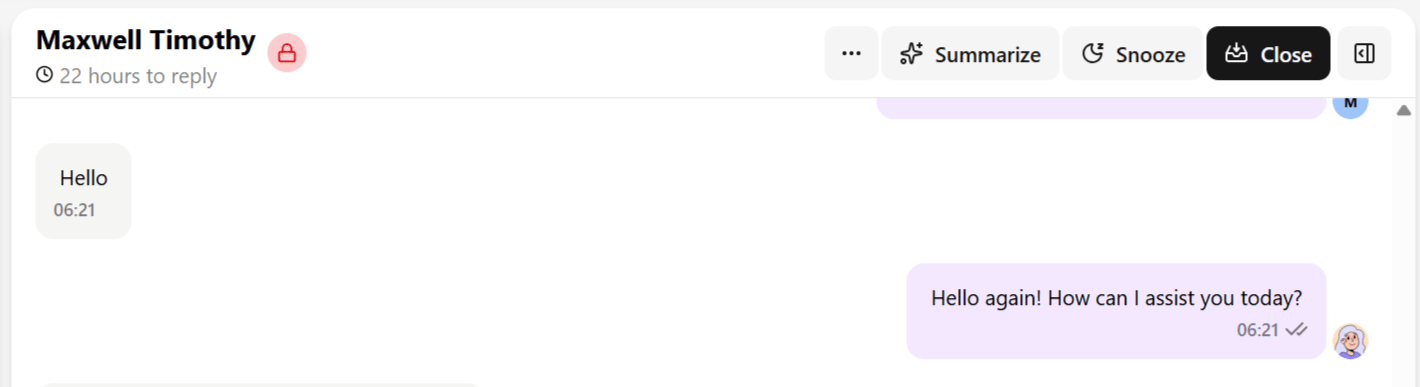
The chat header shows a live countdown while a window applies — something like *"23 hours to reply"* or *"5 days left to reply."* It reads slightly under the full window because the countdown reflects time **remaining**, not time since the window opened.
**Example:** a customer messages you at 9:00 AM asking about your return policy. The 24-hour window opens at that moment and closes at 9:00 AM the next day — unless they message again in the meantime, which resets the clock to a fresh 24 hours from that new message. As long as a contact keeps replying within each rolling window, the conversation can stay in free-form mode indefinitely.
 ## What happens when it expires
Once the window closes on WhatsApp, Messenger, or Instagram:
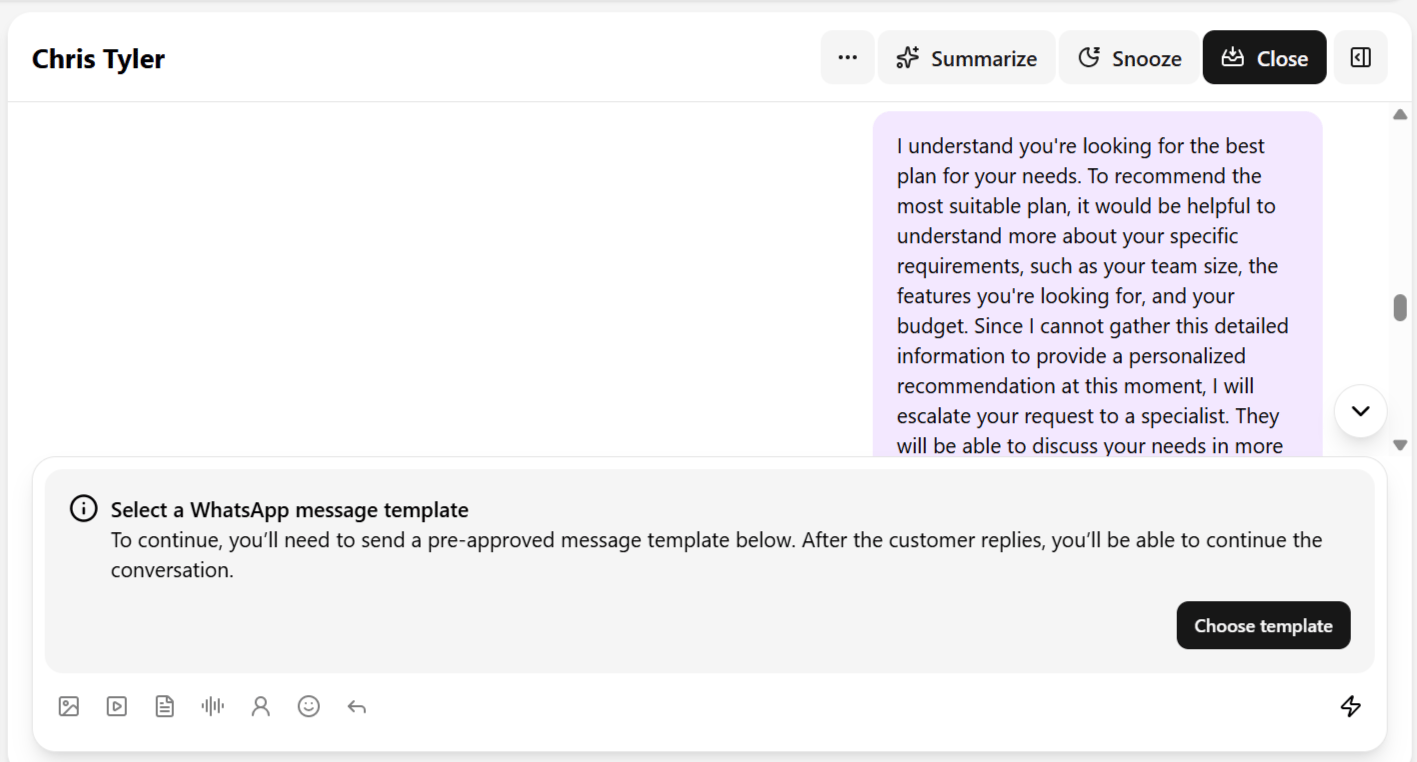
* The text field is replaced with **"Select a WhatsApp message template to continue."**
* A **Choose a template** button appears in its place.
* You cannot send a normal free-form text message, image, or any other unstructured content — only an approved template.
* Sending the template and getting a reply reopens the window, and normal messaging resumes until it lapses again.
## What happens when it expires
Once the window closes on WhatsApp, Messenger, or Instagram:
* The text field is replaced with **"Select a WhatsApp message template to continue."**
* A **Choose a template** button appears in its place.
* You cannot send a normal free-form text message, image, or any other unstructured content — only an approved template.
* Sending the template and getting a reply reopens the window, and normal messaging resumes until it lapses again.
 **Can't send a message in a conversation that worked fine yesterday? This is expected behavior, not a bug.** Work through this in order:
1. **Check the countdown in the chat header.** If it's gone, or the composer already shows a template prompt, the window has expired.
2. **Send an approved template.** Click **Choose a template** in the composer, or use **Actions → Send a WhatsApp template** — see [Chat actions](/help/inbox/chat-actions).
3. **Wait for a reply.** The window reopens as soon as the contact responds, and free-form messaging resumes.
4. **Only then** treat it as a channel issue — if a template also fails to send, check the channel's own troubleshooting page, for example [WhatsApp common issues](/help/messaging-channels/whatsapp/common-issues).
## Why this matters operationally
* **It is not your inbox breaking.** A message box replaced by a template prompt is expected behavior tied to the channel's policy, not a Heyy malfunction.
* **It shapes response-time discipline.** Because WhatsApp and Messenger give you only 24 hours and Instagram gives 7 days, teams handling high volume should prioritize replies within the window — templates are more rigid, slower to get approved, and less natural for the contact than a normal reply.
See [Send a message](/help/inbox/send-a-message) for the composer, and [WhatsApp templates](/help/messaging-channels/whatsapp/whatsapp-templates) for building and managing your template library.
**Can't send a message in a conversation that worked fine yesterday? This is expected behavior, not a bug.** Work through this in order:
1. **Check the countdown in the chat header.** If it's gone, or the composer already shows a template prompt, the window has expired.
2. **Send an approved template.** Click **Choose a template** in the composer, or use **Actions → Send a WhatsApp template** — see [Chat actions](/help/inbox/chat-actions).
3. **Wait for a reply.** The window reopens as soon as the contact responds, and free-form messaging resumes.
4. **Only then** treat it as a channel issue — if a template also fails to send, check the channel's own troubleshooting page, for example [WhatsApp common issues](/help/messaging-channels/whatsapp/common-issues).
## Why this matters operationally
* **It is not your inbox breaking.** A message box replaced by a template prompt is expected behavior tied to the channel's policy, not a Heyy malfunction.
* **It shapes response-time discipline.** Because WhatsApp and Messenger give you only 24 hours and Instagram gives 7 days, teams handling high volume should prioritize replies within the window — templates are more rigid, slower to get approved, and less natural for the contact than a normal reply.
See [Send a message](/help/inbox/send-a-message) for the composer, and [WhatsApp templates](/help/messaging-channels/whatsapp/whatsapp-templates) for building and managing your template library.