> ## Documentation Index
> Fetch the complete documentation index at: https://docs.heyy.io/llms.txt
> Use this file to discover all available pages before exploring further.
# Identity setup
> Set name, brand, role, tone, and answer length for an AI Employee.
**Identity setup** is where you define who your AI employee is and how they sound before you add knowledge, capabilities, or deploy them in automations. These settings live on the **Identity & guidelines** tab in [**AI Employees**](https://app.heyy.io/ai-employees) and apply to every reply unless a [guideline](/help/ai-employees/identity-and-guidelines/write-your-guidelines) or [automation override](/help/ai-employees/going-live/automation-guideline-overrides) says otherwise.
Getting identity right early saves rework later. Role, tone, and answer length shape how customers *feel* the conversation; name, brand, and gender shape who they think they are talking to and how consistently the employee speaks — especially in gendered languages. You can always refine with guidelines — but defaults here set the baseline your team tests in the [Playground](/help/ai-employees/going-live/test-in-playground).
Identity setup covers **Basics** and **Generation settings** only. Detailed behavior rules belong in [Write your guidelines](/help/ai-employees/identity-and-guidelines/write-your-guidelines) and the category articles that follow.
## How identity setup works
When a customer message reaches your AI employee, Heyy combines identity setup with guidelines, [content](/help/ai-employees/content/add-your-website), and [capabilities](/help/ai-employees/capabilities/choose-attributes-to-expose) to produce each reply.
**Basics** answer *who* the employee is — their name, the brand they represent, and their high-level role (support, sales, or general).
**Generation settings** answer *how* they communicate by default — tone of voice and how long answers tend to be.
Think of identity setup as the employee's profile card; [guidelines](/help/ai-employees/identity-and-guidelines/write-your-guidelines) are the playbook they follow in specific situations.
## Configure basics
Open an employee and scroll to **Basics** at the top of **Identity & guidelines**.
 | Field | Description |
| -------------- | ---------------------------------------------------------------------------------------------------------------------------------------------------------------------------------------------------------------------------------------------------------------------------------------------------------------- |
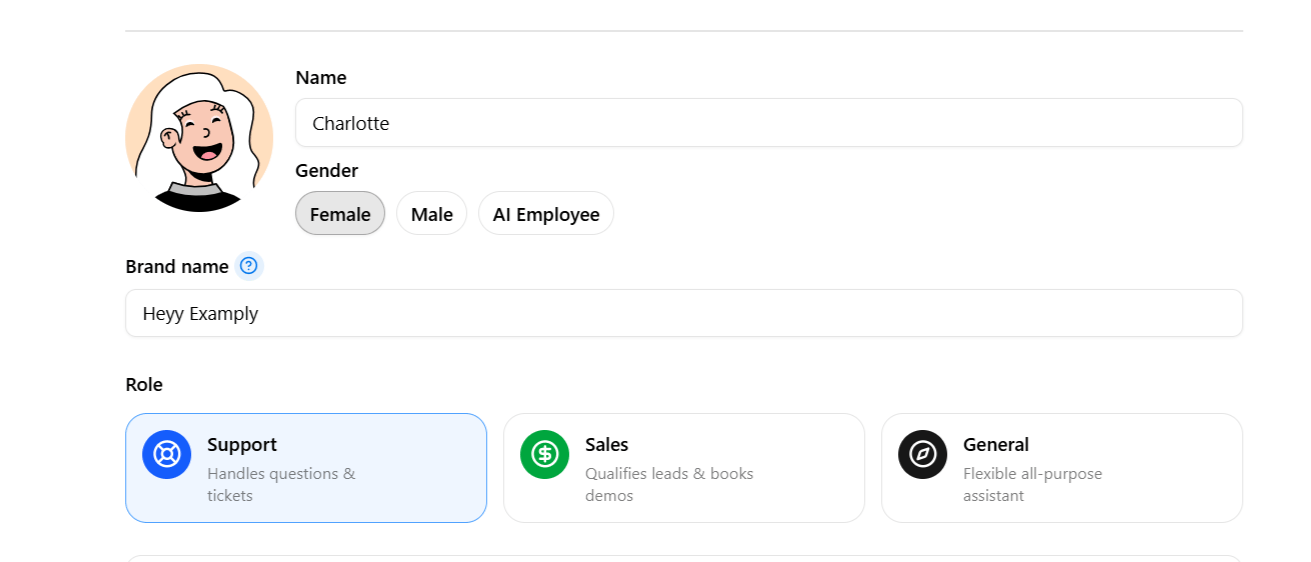
| **Name** | The employee's actual name — used for internal identification across the platform, and depending on how the employee is configured to introduce itself, it may also surface directly in customer-facing conversations. Use a real first name such as Jessica or Jimmy so replies feel human and stay consistent. |
| **Brand name** | The brand the employee says it represents whenever it introduces itself — for example, *"Welcome to \[Brand Name]. I'm an AI Employee for \[Brand Name]."* Use one employee per brand in multi-brand workspaces. |
| **Gender** | Sets the avatar (**Female**, **Male**, or **AI Employee**). Also keeps wording consistent in gendered languages such as Spanish, French, and Hebrew. |
**Role** shapes default behavior before you write guidelines. Each option shows a short description in the app when you select it.
| Field | Description |
| -------------- | ---------------------------------------------------------------------------------------------------------------------------------------------------------------------------------------------------------------------------------------------------------------------------------------------------------------- |
| **Name** | The employee's actual name — used for internal identification across the platform, and depending on how the employee is configured to introduce itself, it may also surface directly in customer-facing conversations. Use a real first name such as Jessica or Jimmy so replies feel human and stay consistent. |
| **Brand name** | The brand the employee says it represents whenever it introduces itself — for example, *"Welcome to \[Brand Name]. I'm an AI Employee for \[Brand Name]."* Use one employee per brand in multi-brand workspaces. |
| **Gender** | Sets the avatar (**Female**, **Male**, or **AI Employee**). Also keeps wording consistent in gendered languages such as Spanish, French, and Hebrew. |
**Role** shapes default behavior before you write guidelines. Each option shows a short description in the app when you select it.
 | Role | Description |
| ----------- | ----------------------------------------------------------------------------------------------------------------------------- |
| **Support** | Handles questions and tickets. Best for FAQ, troubleshooting, order status, and routing issues to the right team. |
| **Sales** | Qualifies leads and books demos. Best for discovery questions, product fit, scheduling, and light objection handling. |
| **General** | Flexible all-purpose assistant. Best for mixed traffic, internal pilots, or channels where one employee handles many intents. |
You are not locked in — guidelines can narrow or override role defaults. Many teams start with **Support** or **General**, then add [Conversation flow & objectives](/help/ai-employees/identity-and-guidelines/conversation-flow-and-objectives) guidelines once they see real customer questions.
Running AI Employees across multiple client accounts or brands under one workspace? Brand name is what keeps every conversation correctly and consistently branded without manually rewriting greetings for each one — set one employee per brand rather than reusing a single employee across brands.
## Basics in practice
The Basics fields are independent and combinable, not five preset personalities to choose between — the right combination depends on the business, the channel, and the job the employee is meant to do. Two employees at the same furniture store illustrate how differently these fields interact:
| Configuration | Reads like |
| ------------------------------------------------------------------- | ---------------------------------------------------------------------------------------------------------------------------- |
| **Sales** role, **Playful** tone, **Concise** answer length | An energetic, quick-witted salesperson who wants to close the sale fast and keep the energy up. |
| **Support** role, **Professional** tone, **Thorough** answer length | A calm, detailed support specialist who wants the customer to fully understand their situation before the conversation ends. |
Neither is inherently better — a useful exercise is to imagine handing a written brief to a new human hire and asking: *if I described our company culture and this role in one paragraph, what would that paragraph say?* Whatever answer comes to mind should map fairly directly onto the Role, Tone, and Answer length choices made here.
## Generation settings
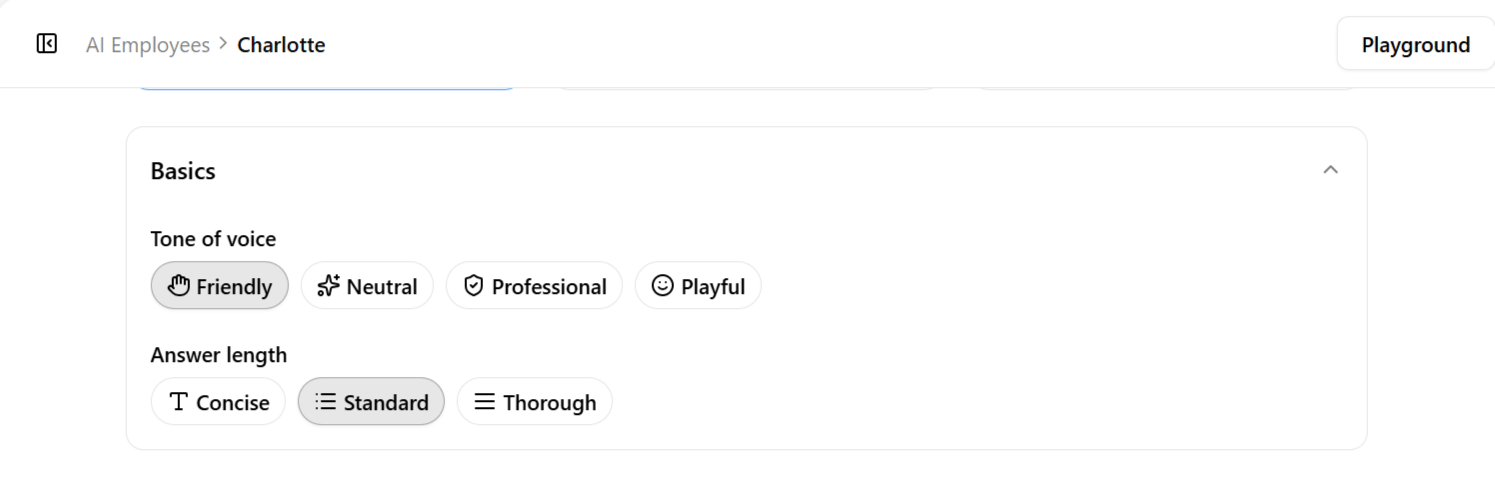
**Tone of voice** and **answer length** set how replies feel and how much detail they include by default. Both apply to every message unless a guideline or [automation override](/help/ai-employees/going-live/automation-guideline-overrides) specifies otherwise.
| Role | Description |
| ----------- | ----------------------------------------------------------------------------------------------------------------------------- |
| **Support** | Handles questions and tickets. Best for FAQ, troubleshooting, order status, and routing issues to the right team. |
| **Sales** | Qualifies leads and books demos. Best for discovery questions, product fit, scheduling, and light objection handling. |
| **General** | Flexible all-purpose assistant. Best for mixed traffic, internal pilots, or channels where one employee handles many intents. |
You are not locked in — guidelines can narrow or override role defaults. Many teams start with **Support** or **General**, then add [Conversation flow & objectives](/help/ai-employees/identity-and-guidelines/conversation-flow-and-objectives) guidelines once they see real customer questions.
Running AI Employees across multiple client accounts or brands under one workspace? Brand name is what keeps every conversation correctly and consistently branded without manually rewriting greetings for each one — set one employee per brand rather than reusing a single employee across brands.
## Basics in practice
The Basics fields are independent and combinable, not five preset personalities to choose between — the right combination depends on the business, the channel, and the job the employee is meant to do. Two employees at the same furniture store illustrate how differently these fields interact:
| Configuration | Reads like |
| ------------------------------------------------------------------- | ---------------------------------------------------------------------------------------------------------------------------- |
| **Sales** role, **Playful** tone, **Concise** answer length | An energetic, quick-witted salesperson who wants to close the sale fast and keep the energy up. |
| **Support** role, **Professional** tone, **Thorough** answer length | A calm, detailed support specialist who wants the customer to fully understand their situation before the conversation ends. |
Neither is inherently better — a useful exercise is to imagine handing a written brief to a new human hire and asking: *if I described our company culture and this role in one paragraph, what would that paragraph say?* Whatever answer comes to mind should map fairly directly onto the Role, Tone, and Answer length choices made here.
## Generation settings
**Tone of voice** and **answer length** set how replies feel and how much detail they include by default. Both apply to every message unless a guideline or [automation override](/help/ai-employees/going-live/automation-guideline-overrides) specifies otherwise.
 | Tone | Description |
| ---------------- | --------------------------------------------------------------------------- |
| **Professional** | B2B, regulated industries, or brands that prioritize clarity and formality. |
| **Neutral** | Balanced default — helpful without strong personality. |
| **Friendly** | Consumer brands, onboarding, and support where warmth builds trust. |
| **Playful** | Casual brands where humor and lightness match your marketing voice. |
| Answer length | Description |
| ------------- | ------------------------------------------------------------------- |
| **Concise** | High-volume or mobile-first chats; quick, direct answers. |
| **Standard** | Most support and sales flows — enough context without overwhelming. |
| **Thorough** | Complex products, onboarding, or step-by-step guidance. |
Match tone to channel and audience — fintech WhatsApp often suits **Professional** or **Neutral**; D2C Instagram may suit **Friendly**. Pair **Concise** length with fast-moving channels like SMS. Pair **Thorough** length with [Content](/help/ai-employees/content/add-your-website) and [Q\&A](/help/ai-employees/content/build-qa-knowledge-base) so longer answers stay accurate. If tone varies by channel, use [automation guideline overrides](/help/ai-employees/going-live/automation-guideline-overrides) instead of cloning employees.
## Identity setup vs guidelines
Identity setup and guidelines work together but serve different jobs.
| | Identity setup | Guidelines |
| ---------------------- | ------------------------------- | -------------------------------------------------- |
| **Purpose** | Global defaults for every reply | Structured rules by category |
| **Examples** | Role, tone, answer length | Escalation rules, when to use @Content, boundaries |
| **Where to configure** | Basics + Generation settings | Accordion categories on the same tab |
Defaults from this page are always active. Guidelines add nuance — for example, [Boundaries](/help/ai-employees/identity-and-guidelines/boundaries) for what not to say, or [Identity & style](/help/ai-employees/identity-and-guidelines/identity-and-style) for how to introduce the brand in the first message.
| Tone | Description |
| ---------------- | --------------------------------------------------------------------------- |
| **Professional** | B2B, regulated industries, or brands that prioritize clarity and formality. |
| **Neutral** | Balanced default — helpful without strong personality. |
| **Friendly** | Consumer brands, onboarding, and support where warmth builds trust. |
| **Playful** | Casual brands where humor and lightness match your marketing voice. |
| Answer length | Description |
| ------------- | ------------------------------------------------------------------- |
| **Concise** | High-volume or mobile-first chats; quick, direct answers. |
| **Standard** | Most support and sales flows — enough context without overwhelming. |
| **Thorough** | Complex products, onboarding, or step-by-step guidance. |
Match tone to channel and audience — fintech WhatsApp often suits **Professional** or **Neutral**; D2C Instagram may suit **Friendly**. Pair **Concise** length with fast-moving channels like SMS. Pair **Thorough** length with [Content](/help/ai-employees/content/add-your-website) and [Q\&A](/help/ai-employees/content/build-qa-knowledge-base) so longer answers stay accurate. If tone varies by channel, use [automation guideline overrides](/help/ai-employees/going-live/automation-guideline-overrides) instead of cloning employees.
## Identity setup vs guidelines
Identity setup and guidelines work together but serve different jobs.
| | Identity setup | Guidelines |
| ---------------------- | ------------------------------- | -------------------------------------------------- |
| **Purpose** | Global defaults for every reply | Structured rules by category |
| **Examples** | Role, tone, answer length | Escalation rules, when to use @Content, boundaries |
| **Where to configure** | Basics + Generation settings | Accordion categories on the same tab |
Defaults from this page are always active. Guidelines add nuance — for example, [Boundaries](/help/ai-employees/identity-and-guidelines/boundaries) for what not to say, or [Identity & style](/help/ai-employees/identity-and-guidelines/identity-and-style) for how to introduce the brand in the first message.