> ## Documentation Index
> Fetch the complete documentation index at: https://docs.heyy.io/llms.txt
> Use this file to discover all available pages before exploring further.
# Conversation flow & objectives
> Guidelines for goals, content, actions, and assets in each chat.
**Conversation flow & objectives** is the second guideline category on the **Identity & guidelines** tab. Use it for what your employee should achieve in each thread and when to pull @Content, run @Actions, or send @Assets.
Goals should describe what the *employee* tries to do — qualify a lead, troubleshoot before handoff, send the right brochure — not internal team OKRs. Pair flow guidelines with [content](/help/ai-employees/content/add-your-website) and [capabilities](/help/ai-employees/capabilities/choose-attributes-to-expose) so @mentions resolve in the prompt editor.
[Content](/help/ai-employees/content/add-your-website), [Actions](/help/ai-employees/capabilities/actions-overview), and [Assets](/help/ai-employees/capabilities/share-files-in-chat) are the **resources** — this category is where you write the **logic** for when those resources actually get used. For example, a fashion brand with a size guide PDF uploaded as an asset would write a guideline like: *when a customer asks about sizing, explain the relevant information conversationally and attach the size guide PDF directly.* The same pattern extends to sending a product video link or a product image — the employee does not just describe the item in text, it proactively shares the asset that answers the question best.
Use @mentions in prompts so the employee knows which knowledge, tools, or files you mean. If the menu is empty, configure [attributes](/help/ai-employees/capabilities/choose-attributes-to-expose), [content](/help/ai-employees/content/add-your-website), [actions](/help/ai-employees/capabilities/actions-overview), or [assets](/help/ai-employees/capabilities/share-files-in-chat) first.
## When to use Conversation flow & objectives
Open the **Conversation flow & objectives** accordion in [**AI Employees**](https://app.heyy.io/ai-employees) when you need per-thread goals and orchestration rules.
 | Use Conversation flow & objectives for | Use another category instead |
| ------------------------------------------- | ------------------------------------------------------------------------------------------------------------------ |
| Qualifying leads and driving to a next step | Voice, tone, and introductions → [Identity & style](/help/ai-employees/identity-and-guidelines/identity-and-style) |
| When to search @Content or send @Assets | Hard limits and escalation → [Boundaries](/help/ai-employees/identity-and-guidelines/boundaries) |
| When to run @Actions or collect @Attributes | Seasonal promos and one-offs → [Other](/help/ai-employees/identity-and-guidelines/other) |
| Troubleshooting steps before handoff | Global defaults → [Identity setup](/help/ai-employees/identity-and-guidelines/identity-setup) |
Wire handoff behavior in [exit points](/help/ai-employees/capabilities/create-exit-points) and [hand off to a human](/help/ai-employees/going-live/hand-off-to-human) so flow guidelines match what automations actually do.
## Example guidelines
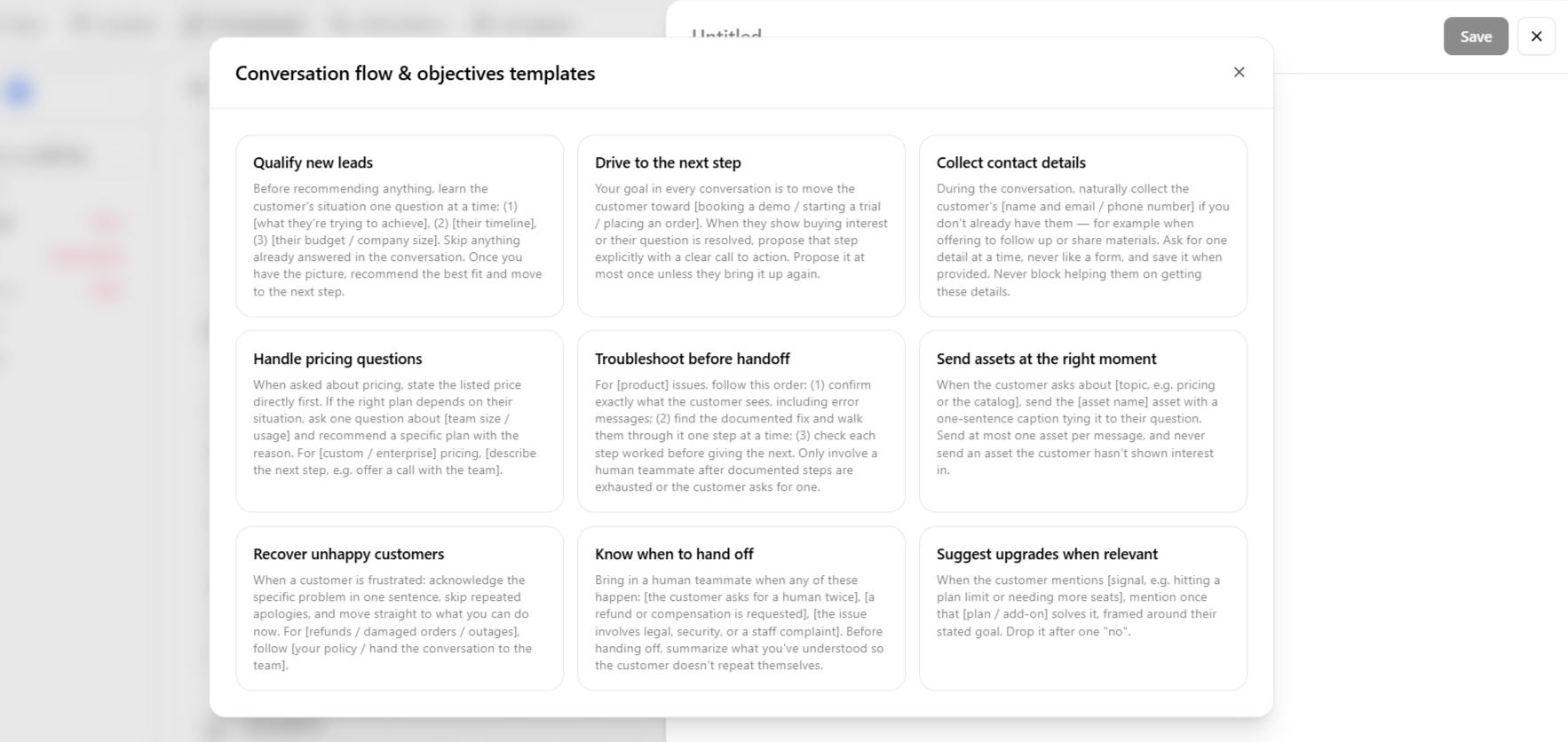
These are the three default **Suggestions** templates in the app. Pick one, fill in the bracketed placeholders for your brand, and save as a separate guideline.
**Qualify new leads**
> Before recommending anything, learn the customer's situation one question at a time: (1) \[what they're trying to achieve], (2) \[their timeline], (3) \[their budget / company size]. Skip anything already answered in the conversation. Once you have the picture, recommend the best fit and move to the next step.
**Drive to the next step**
> Your goal in every conversation is to move the customer toward \[booking a demo / starting a trial / placing an order]. When they show buying interest or their question is resolved, propose that step explicitly with a clear call to action. Propose it at most once unless they bring it up again.
**Collect contact details**
> During the conversation, naturally collect the customer's \[name and email / phone number] if you don't already have them — for example when offering to follow up or share materials. Ask for one detail at a time, never like a form, and save it when provided. Never block helping them on getting these details.
## Common mistakes
| Mistake | What to do instead |
| ----------------------------------------------- | ------------------------------------------------------------------------------------------------------------------ |
| Putting voice or introduction rules here | Move them to [Identity & style](/help/ai-employees/identity-and-guidelines/identity-and-style). |
| Putting hard limits or escalation triggers here | Move them to [Boundaries](/help/ai-employees/identity-and-guidelines/boundaries). |
| Flow rules without matching exit points | Align handoff language with [exit points](/help/ai-employees/capabilities/create-exit-points) in your automations. |
| Vague goals with no @mentions | Name the @Content, @Actions, or @Assets the employee should use. |
| Use Conversation flow & objectives for | Use another category instead |
| ------------------------------------------- | ------------------------------------------------------------------------------------------------------------------ |
| Qualifying leads and driving to a next step | Voice, tone, and introductions → [Identity & style](/help/ai-employees/identity-and-guidelines/identity-and-style) |
| When to search @Content or send @Assets | Hard limits and escalation → [Boundaries](/help/ai-employees/identity-and-guidelines/boundaries) |
| When to run @Actions or collect @Attributes | Seasonal promos and one-offs → [Other](/help/ai-employees/identity-and-guidelines/other) |
| Troubleshooting steps before handoff | Global defaults → [Identity setup](/help/ai-employees/identity-and-guidelines/identity-setup) |
Wire handoff behavior in [exit points](/help/ai-employees/capabilities/create-exit-points) and [hand off to a human](/help/ai-employees/going-live/hand-off-to-human) so flow guidelines match what automations actually do.
## Example guidelines
These are the three default **Suggestions** templates in the app. Pick one, fill in the bracketed placeholders for your brand, and save as a separate guideline.
**Qualify new leads**
> Before recommending anything, learn the customer's situation one question at a time: (1) \[what they're trying to achieve], (2) \[their timeline], (3) \[their budget / company size]. Skip anything already answered in the conversation. Once you have the picture, recommend the best fit and move to the next step.
**Drive to the next step**
> Your goal in every conversation is to move the customer toward \[booking a demo / starting a trial / placing an order]. When they show buying interest or their question is resolved, propose that step explicitly with a clear call to action. Propose it at most once unless they bring it up again.
**Collect contact details**
> During the conversation, naturally collect the customer's \[name and email / phone number] if you don't already have them — for example when offering to follow up or share materials. Ask for one detail at a time, never like a form, and save it when provided. Never block helping them on getting these details.
## Common mistakes
| Mistake | What to do instead |
| ----------------------------------------------- | ------------------------------------------------------------------------------------------------------------------ |
| Putting voice or introduction rules here | Move them to [Identity & style](/help/ai-employees/identity-and-guidelines/identity-and-style). |
| Putting hard limits or escalation triggers here | Move them to [Boundaries](/help/ai-employees/identity-and-guidelines/boundaries). |
| Flow rules without matching exit points | Align handoff language with [exit points](/help/ai-employees/capabilities/create-exit-points) in your automations. |
| Vague goals with no @mentions | Name the @Content, @Actions, or @Assets the employee should use. |