> ## Documentation Index
> Fetch the complete documentation index at: https://docs.heyy.io/llms.txt
> Use this file to discover all available pages before exploring further.
# Set reply timeouts
> Handle a contact who stops replying with the Contact Not Replied condition.
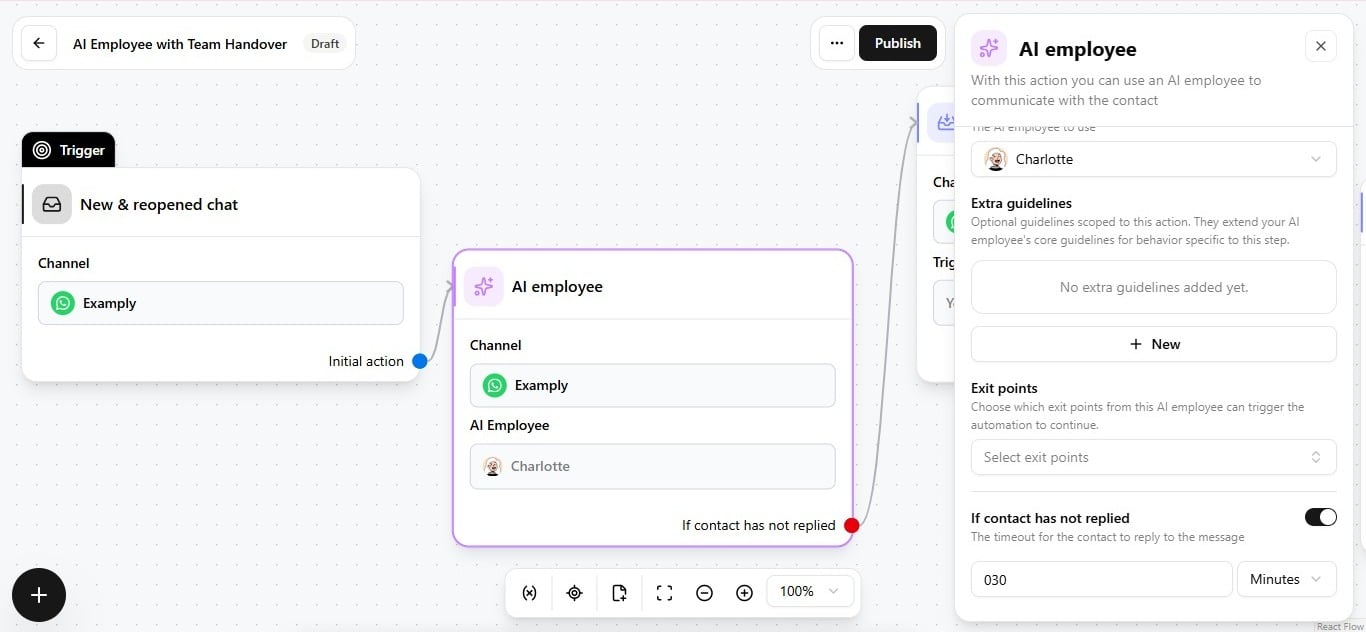
**Reply timeout**, also called **Contact Not Replied**, is a timer condition on the **AI Employee** automation action: if the contact does not reply within a set window, the automation can act instead of leaving the conversation open indefinitely.
## Configure it
1. Open the **AI Employee** action in the automation editor.
2. Set the **Reply timeout** duration and unit to match your SLA — for example, 30 minutes.
3. Connect the timeout branch to whatever should happen next.
 ## What to do when it fires
| Outcome | When to use it |
| ------------------------------- | ------------------------------------------------------------------------------------------ |
| **Close the chat** | The conversation was likely resolved or abandoned; free it up rather than leaving it open. |
| **Reassign it** | Route to a different team or teammate for a fresh follow-up attempt. |
| **Hand to another AI Employee** | Trigger a different employee for a lighter-touch, automated follow-up message. |
Fully custom — place the timeout condition wherever it is useful in the flow, and pair it with whatever next step matches your SLA. See [Add an AI employee to an automation](/help/ai-employees/going-live/add-to-automation) for how this fits alongside channel selection and exit points on the same action.
## What to do when it fires
| Outcome | When to use it |
| ------------------------------- | ------------------------------------------------------------------------------------------ |
| **Close the chat** | The conversation was likely resolved or abandoned; free it up rather than leaving it open. |
| **Reassign it** | Route to a different team or teammate for a fresh follow-up attempt. |
| **Hand to another AI Employee** | Trigger a different employee for a lighter-touch, automated follow-up message. |
Fully custom — place the timeout condition wherever it is useful in the flow, and pair it with whatever next step matches your SLA. See [Add an AI employee to an automation](/help/ai-employees/going-live/add-to-automation) for how this fits alongside channel selection and exit points on the same action.