> ## Documentation Index
> Fetch the complete documentation index at: https://docs.heyy.io/llms.txt
> Use this file to discover all available pages before exploring further.
# How AI employees work in automations
> Triggers, the AI Employee action, replies, exit points, and what happens next.
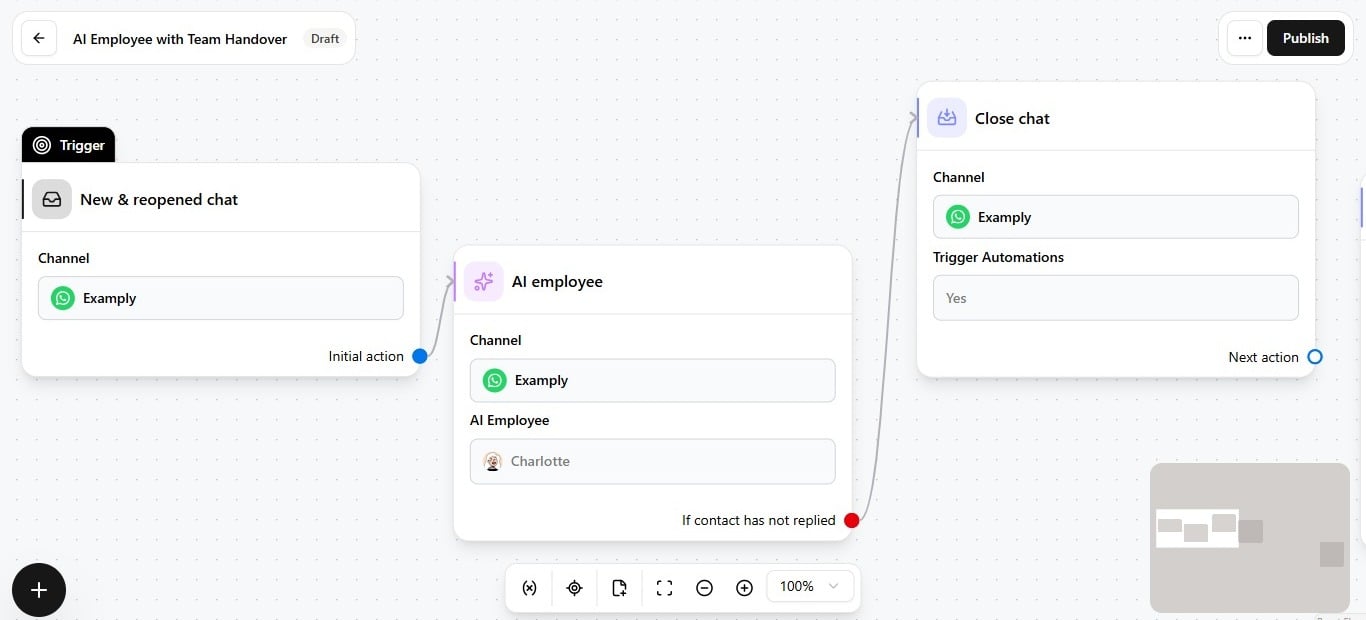
AI Employees reach customers through **automations** — not by sitting on a channel alone. Once a channel is connected and an automation includes an **AI Employee** action, the employee becomes a step any workflow can hand a conversation to.
## The flow
1. **Trigger fires** — for example, a new incoming message on WhatsApp, or a reopened chat.
2. **Automation runs** — the workflow executes its steps for that contact.
3. **AI Employee action** — a node selects the [channel, employee, and optional per-automation context](/help/ai-employees/going-live/channel-and-context).
4. **Employee replies** — using its [identity](/help/ai-employees/identity-and-guidelines/identity-setup), [content](/help/ai-employees/content/add-your-website), and [capabilities](/help/ai-employees/capabilities/actions-overview) to respond in the thread.
5. **Exit point fires** (optional) — when a condition matches, the AI step ends and the automation branches — handoff, close, follow-up, and so on. See [Use exit points in automations](/help/ai-employees/going-live/use-exit-points-in-automations).
6. **Next steps** — assign chat, notify a teammate, send a message, or close, configured on the branches after the AI Employee node.
 ## What the employee does not control
| Not controlled by the employee | Controlled by |
| ------------------------------ | --------------------------------------------------------------------------------------------------------------------------------------- |
| **When it runs** | The automation's trigger and graph. |
| **Channel routing** | The automation node — must match where the trigger fired. See [Channel and context](/help/ai-employees/going-live/channel-and-context). |
| **Handoff routing** | [Exit point mappings](/help/ai-employees/going-live/use-exit-points-in-automations) to inbox or team actions. |
## Before going live
1. Configure the employee in [**AI Employees**](https://app.heyy.io/ai-employees).
2. [Test in the Playground](/help/ai-employees/going-live/test-in-playground) and set it live.
3. [Add the employee to an automation](/help/ai-employees/going-live/add-to-automation) and publish.
AI Employees complement [automations](/help/automations/index) and your [inbox](/help/inbox/inbox-tour) — automations orchestrate *when* an employee runs; the inbox is where humans take over after handoff.
## What the employee does not control
| Not controlled by the employee | Controlled by |
| ------------------------------ | --------------------------------------------------------------------------------------------------------------------------------------- |
| **When it runs** | The automation's trigger and graph. |
| **Channel routing** | The automation node — must match where the trigger fired. See [Channel and context](/help/ai-employees/going-live/channel-and-context). |
| **Handoff routing** | [Exit point mappings](/help/ai-employees/going-live/use-exit-points-in-automations) to inbox or team actions. |
## Before going live
1. Configure the employee in [**AI Employees**](https://app.heyy.io/ai-employees).
2. [Test in the Playground](/help/ai-employees/going-live/test-in-playground) and set it live.
3. [Add the employee to an automation](/help/ai-employees/going-live/add-to-automation) and publish.
AI Employees complement [automations](/help/automations/index) and your [inbox](/help/inbox/inbox-tour) — automations orchestrate *when* an employee runs; the inbox is where humans take over after handoff.