> ## Documentation Index
> Fetch the complete documentation index at: https://docs.heyy.io/llms.txt
> Use this file to discover all available pages before exploring further.
# Add your website
> Crawl static pages so your employee answers from your site — and know when not to.
**Links** is one of four source types on the **Content** tab (along with [Documents](/help/ai-employees/content/upload-documents), [Text](/help/ai-employees/content/add-plain-text-knowledge), and [Q\&A](/help/ai-employees/content/build-qa-knowledge-base)). Use it to crawl a single page or an entire site so the employee can answer from your actual content instead of guessing.
Do not crawl store-based sites such as Shopify or WooCommerce for product data. See [Don't crawl store data](#dont-crawl-store-data-shopify-woocommerce) below.
## Add a link
1. Open the **Content** tab and click **Add Content** in the top-right corner.
2. Choose **Add Link** from the dropdown.
3. Enter a URL, then choose a crawl option:
| Option | What it does |
| ----------------- | ------------------------------------------------------------------------------------------------------------------------------------------------------------------------------------------ |
| **Website Crawl** | Crawls the entire site, following links layer by layer and going progressively deeper through the site's structure — useful for absorbing an entire domain's worth of content in one pass. |
| **Single Link** | Crawls only the specific page provided, with no further traversal — the right choice for a single FAQ page, policy page, or product page. |
4. Save. The page is queued for the next training cycle; see [Keep knowledge accurate](/help/ai-employees/content/keep-knowledge-accurate) for how training works.
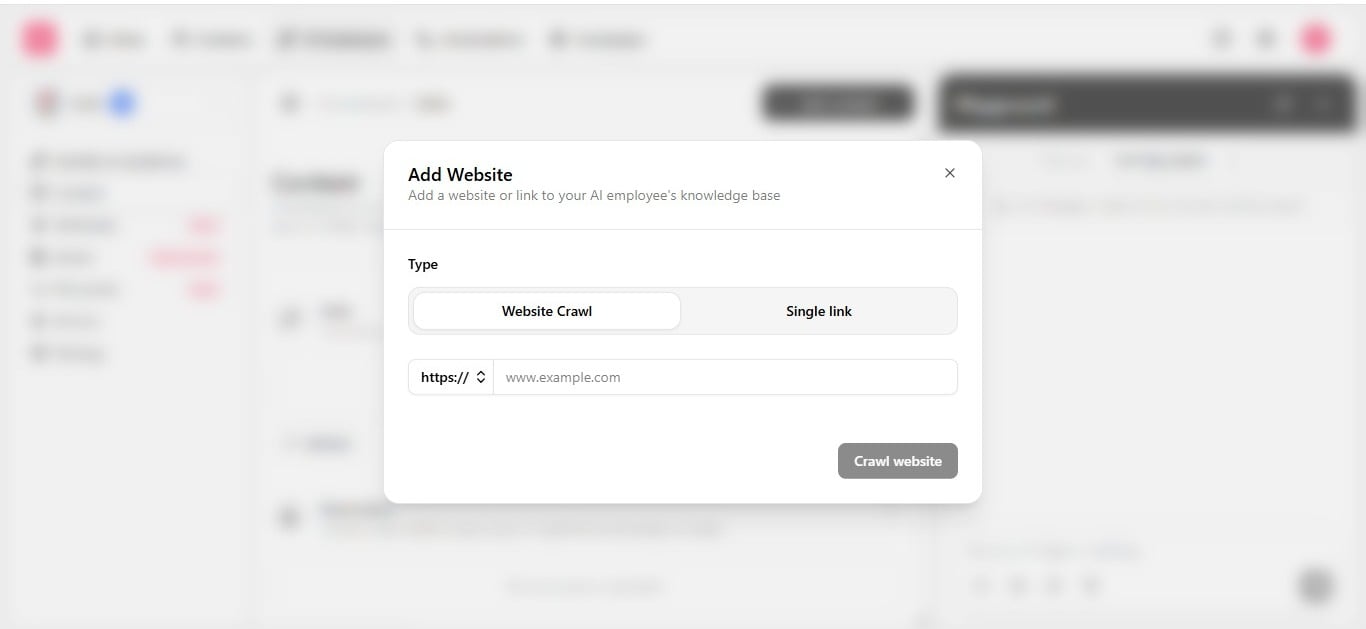 Choosing between the two is a question of scope. Setting up an employee for the first time and want broad understanding of the business? **Website Crawl** is the faster route to comprehensive coverage. Adding one narrow, specific update — a new terms-of-service page, for instance? **Single Link** avoids re-processing content that has not changed.
Links are internal to the employee — they are never sent to a contact. Reference a link directly in a [guideline](/help/ai-employees/identity-and-guidelines/write-your-guidelines) with `@Content` when the employee should prefer a specific source over others.
## Don't crawl store data (Shopify, WooCommerce)
A crawled page is frozen the moment it is indexed. Your store is not — prices change, items sell out, variants get added, and none of that reaches the employee until the next crawl, if one even runs again. The employee has no way to tell a crawled page is outdated: it will confirm a price or state something is in stock with full confidence, using data that is already wrong. That is worse than not knowing the answer.
| Content type | Use |
| ------------------------------------------------- | --------------------------------------------------------------------------------------------------------------------- |
| Prices, stock, order status | [Custom API action](/help/ai-employees/capabilities/call-an-external-api) — live lookup at the moment a customer asks |
| FAQs, shipping policy, return policy, about pages | Crawled link — static content is exactly what crawling is good at |
If you are not sure whether something belongs as a crawled link or an action, ask: does this change without someone rewriting the page? If yes, it needs an action, not a crawl.
For example, to answer "is the medium blue hoodie in stock?" reliably, build a **Custom API Call** named something like *Check Product Stock*, with a `product_name` or `sku` input parameter, pointed at your store's live product API — see [Call an external API](/help/ai-employees/capabilities/call-an-external-api).
Choosing between the two is a question of scope. Setting up an employee for the first time and want broad understanding of the business? **Website Crawl** is the faster route to comprehensive coverage. Adding one narrow, specific update — a new terms-of-service page, for instance? **Single Link** avoids re-processing content that has not changed.
Links are internal to the employee — they are never sent to a contact. Reference a link directly in a [guideline](/help/ai-employees/identity-and-guidelines/write-your-guidelines) with `@Content` when the employee should prefer a specific source over others.
## Don't crawl store data (Shopify, WooCommerce)
A crawled page is frozen the moment it is indexed. Your store is not — prices change, items sell out, variants get added, and none of that reaches the employee until the next crawl, if one even runs again. The employee has no way to tell a crawled page is outdated: it will confirm a price or state something is in stock with full confidence, using data that is already wrong. That is worse than not knowing the answer.
| Content type | Use |
| ------------------------------------------------- | --------------------------------------------------------------------------------------------------------------------- |
| Prices, stock, order status | [Custom API action](/help/ai-employees/capabilities/call-an-external-api) — live lookup at the moment a customer asks |
| FAQs, shipping policy, return policy, about pages | Crawled link — static content is exactly what crawling is good at |
If you are not sure whether something belongs as a crawled link or an action, ask: does this change without someone rewriting the page? If yes, it needs an action, not a crawl.
For example, to answer "is the medium blue hoodie in stock?" reliably, build a **Custom API Call** named something like *Check Product Stock*, with a `product_name` or `sku` input parameter, pointed at your store's live product API — see [Call an external API](/help/ai-employees/capabilities/call-an-external-api).