> ## Documentation Index
> Fetch the complete documentation index at: https://docs.heyy.io/llms.txt
> Use this file to discover all available pages before exploring further.
# Create exit points
> Every way a conversation can end — and why none of them work until selected in an automation.
An **exit point** is how your AI Employee recognizes that it should exit or hand off the conversation, and what should happen next. The two most common exit points are **escalation** and **resolution** — but you are not limited to one of each; you can define many different escalation and resolution exit points, and each one can be routed to its own automation flow afterward.
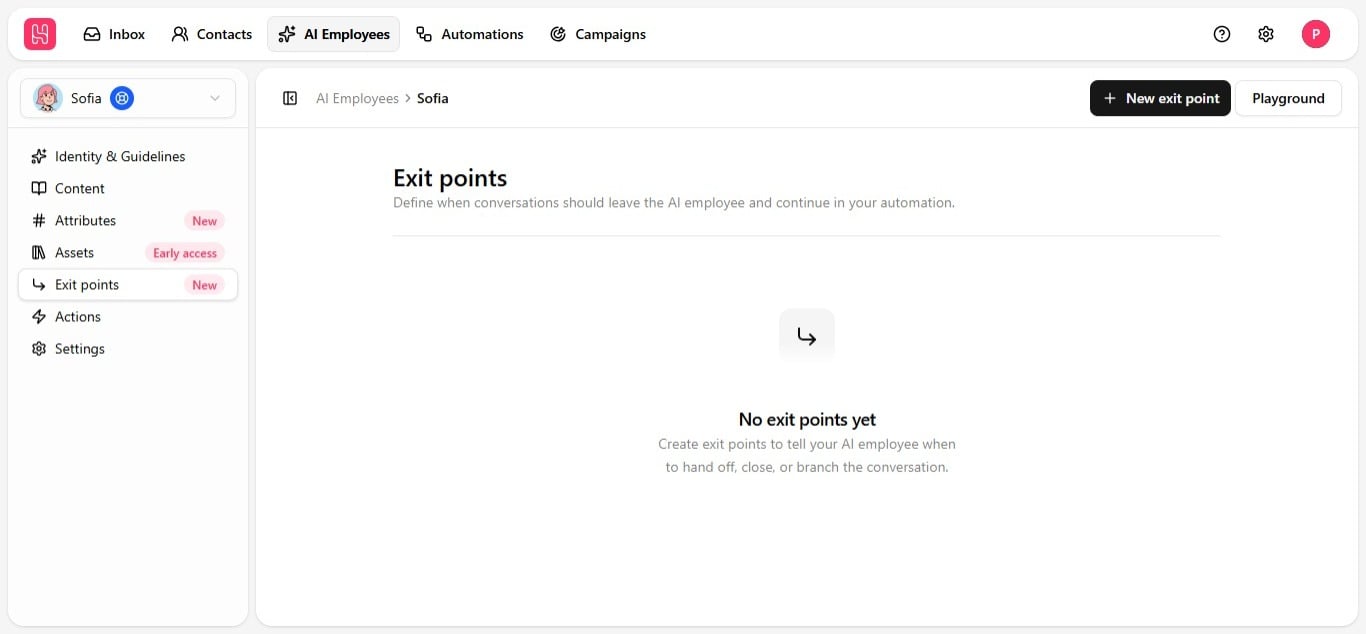 Configuring an exit point on the employee is not enough on its own. Every [automation](/help/automations/index) the employee runs in has its own exit point selection — if it is not explicitly selected there, the employee will not use it, even though it is fully set up here. See [Use exit points in automations](/help/ai-employees/going-live/use-exit-points-in-automations).
## It's broader than escalation
An exit point can represent any resolution:
| Type | Example |
| ----------------------- | ---------------------------------------------------------------- |
| **Escalation** | The contact asks for a human, or the issue needs human judgment. |
| **Resolution** | The issue is actually solved, no handoff needed. |
| **A qualified outcome** | A lead is warm and ready to be handed to sales. |
You are not limited to a single generic "escalate to human" option — create as many exit points as you need, each with its own name and trigger condition: escalate to a specific team, escalate to a named teammate, flag a warm lead, close out a resolved ticket. Whatever shape your workflow needs.
## Create an exit point
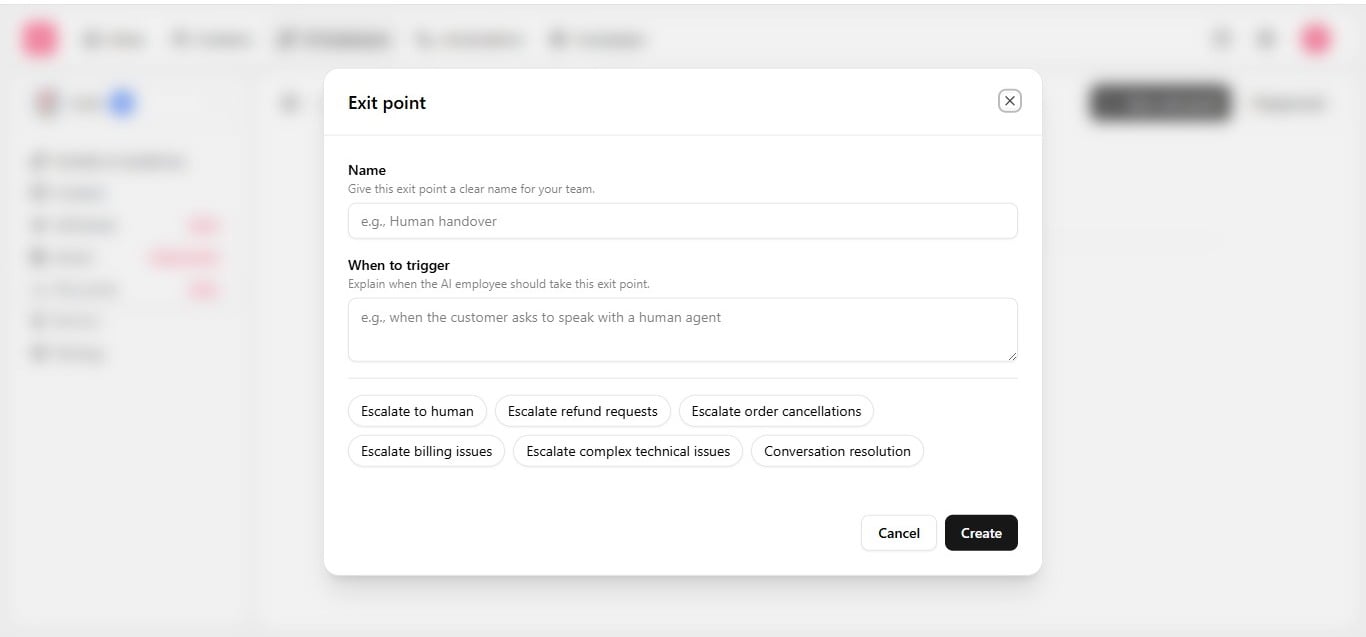
1. On the **Exit points** tab, click **New exit point**.
2. Enter a clear, friendly **name** — for example, *"Escalate to Human"* or *"Resolved"*.
3. Write the **prompt** — describe, in plain language, exactly when this exit should trigger.
4. Set **status** to active when you are ready to use it.
5. Save.
Configuring an exit point on the employee is not enough on its own. Every [automation](/help/automations/index) the employee runs in has its own exit point selection — if it is not explicitly selected there, the employee will not use it, even though it is fully set up here. See [Use exit points in automations](/help/ai-employees/going-live/use-exit-points-in-automations).
## It's broader than escalation
An exit point can represent any resolution:
| Type | Example |
| ----------------------- | ---------------------------------------------------------------- |
| **Escalation** | The contact asks for a human, or the issue needs human judgment. |
| **Resolution** | The issue is actually solved, no handoff needed. |
| **A qualified outcome** | A lead is warm and ready to be handed to sales. |
You are not limited to a single generic "escalate to human" option — create as many exit points as you need, each with its own name and trigger condition: escalate to a specific team, escalate to a named teammate, flag a warm lead, close out a resolved ticket. Whatever shape your workflow needs.
## Create an exit point
1. On the **Exit points** tab, click **New exit point**.
2. Enter a clear, friendly **name** — for example, *"Escalate to Human"* or *"Resolved"*.
3. Write the **prompt** — describe, in plain language, exactly when this exit should trigger.
4. Set **status** to active when you are ready to use it.
5. Save.
 Common examples:
| Name | Trigger condition |
| --------------------- | ----------------------------------------------------------------- |
| **Escalate to Human** | The contact asks for a person, or the issue needs human judgment. |
| **Escalate to Sales** | A warm lead is ready for a human conversation. |
| **Refund Request** | The contact asks for a refund. |
| **Resolved** | The contact confirms they got what they needed. |
Common examples:
| Name | Trigger condition |
| --------------------- | ----------------------------------------------------------------- |
| **Escalate to Human** | The contact asks for a person, or the issue needs human judgment. |
| **Escalate to Sales** | A warm lead is ready for a human conversation. |
| **Refund Request** | The contact asks for a refund. |
| **Resolved** | The contact confirms they got what they needed. |
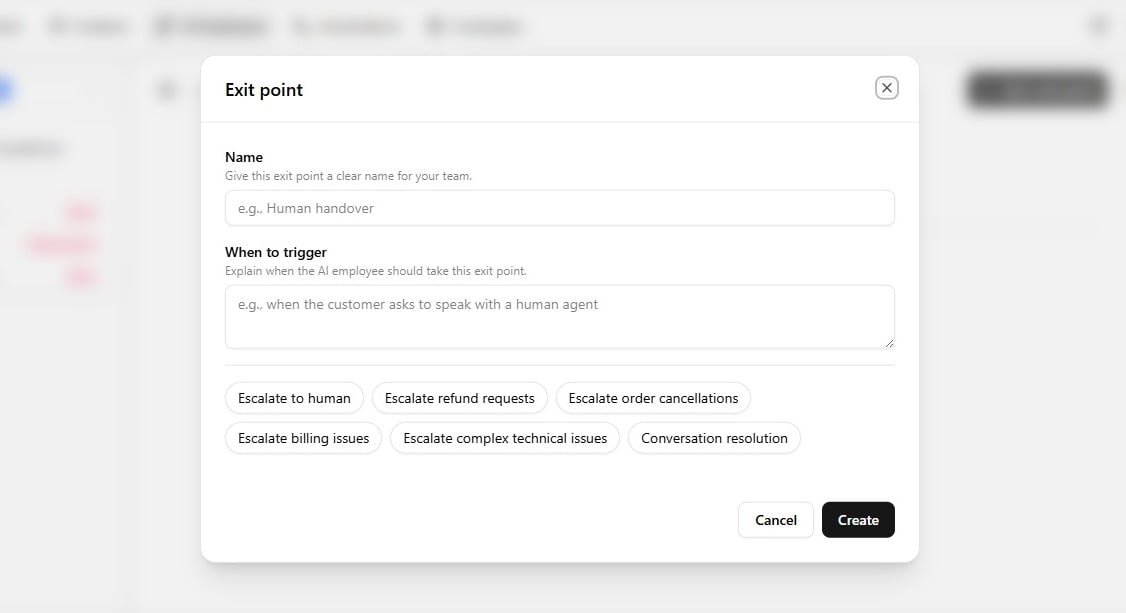 The employee reads the conversation and decides which, if any, exit point matches, then acts on it. You can create as many as you need — there is no cap — and each can be routed differently downstream in an automation.
Write prompts the way you would brief a teammate — specific, observable situations work better than vague rules. Align handoff exits with [Boundaries](/help/ai-employees/identity-and-guidelines/boundaries) so escalation triggers and hard limits use the same language.
## More scenarios worth an exit point
Because trigger instructions are entirely freehand, exit points can be shaped around whatever genuinely warrants human involvement for your business:
| Scenario | Why it needs a human |
| ----------------------------------- | ------------------------------------------------------------------------------------------------------------------------------------------------------------------------------------------------ |
| **Repeated unresolved issue** | The employee has already attempted a fix once or twice and the customer indicates the problem persists — continued automated attempts are less valuable than a human approaching it differently. |
| **Refund outside standard policy** | The request falls outside the stated policy window or is a genuinely unique circumstance — a human can apply discretion instead of the employee simply repeating the policy. |
| **Cancellation requiring judgment** | Unusual circumstances around a cancellation are better routed to a human than resolved purely by policy lookup. |
| **Complex technical issue** | Standard troubleshooting cannot resolve a reported bug, or it clearly needs engineering investigation. |
The principle underneath all of these: an employee can resolve the large majority of routine conversations independently, but some situations benefit from human judgment specifically. Exit points formalize, in advance, exactly where that line sits for your business, rather than discovering it reactively when a conversation goes wrong.
Set at least one escalation exit point before going live — without one, the employee keeps trying to handle a conversation it is not equipped for, instead of handing it to a person. Test each exit point in the [Playground](/help/ai-employees/going-live/test-in-playground), then wire it into an automation via [Use exit points in automations](/help/ai-employees/going-live/use-exit-points-in-automations).
The employee reads the conversation and decides which, if any, exit point matches, then acts on it. You can create as many as you need — there is no cap — and each can be routed differently downstream in an automation.
Write prompts the way you would brief a teammate — specific, observable situations work better than vague rules. Align handoff exits with [Boundaries](/help/ai-employees/identity-and-guidelines/boundaries) so escalation triggers and hard limits use the same language.
## More scenarios worth an exit point
Because trigger instructions are entirely freehand, exit points can be shaped around whatever genuinely warrants human involvement for your business:
| Scenario | Why it needs a human |
| ----------------------------------- | ------------------------------------------------------------------------------------------------------------------------------------------------------------------------------------------------ |
| **Repeated unresolved issue** | The employee has already attempted a fix once or twice and the customer indicates the problem persists — continued automated attempts are less valuable than a human approaching it differently. |
| **Refund outside standard policy** | The request falls outside the stated policy window or is a genuinely unique circumstance — a human can apply discretion instead of the employee simply repeating the policy. |
| **Cancellation requiring judgment** | Unusual circumstances around a cancellation are better routed to a human than resolved purely by policy lookup. |
| **Complex technical issue** | Standard troubleshooting cannot resolve a reported bug, or it clearly needs engineering investigation. |
The principle underneath all of these: an employee can resolve the large majority of routine conversations independently, but some situations benefit from human judgment specifically. Exit points formalize, in advance, exactly where that line sits for your business, rather than discovering it reactively when a conversation goes wrong.
Set at least one escalation exit point before going live — without one, the employee keeps trying to handle a conversation it is not equipped for, instead of handing it to a person. Test each exit point in the [Playground](/help/ai-employees/going-live/test-in-playground), then wire it into an automation via [Use exit points in automations](/help/ai-employees/going-live/use-exit-points-in-automations).