> ## Documentation Index
> Fetch the complete documentation index at: https://docs.heyy.io/llms.txt
> Use this file to discover all available pages before exploring further.
# Choose which attributes to expose
> Attributes are the contact fields your employee can read, share, or update — and why the three permissions are not the same.
**Attributes** are the contact data your AI Employee can work with during a conversation — first name, last name, email, phone, plus any custom field defined under [**Settings → Attributes**](/help/contacts/mini-crm/custom-attributes-as-columns). Heyy's built-in CRM stores these fields for every contact, and this tab is the permission layer between the employee and that CRM — the same principle of least-necessary-access you'd apply to a human employee's database access applies here: grant permissions deliberately, field by field, based on what the role genuinely requires.
Your employee typically operates across multiple channels — WhatsApp being one example among several — and a single contact may reach out through more than one of them over time. Attributes determine whether the employee can pull up that contact's first name mid-conversation on any channel, reference a stored email, check a custom field like RSVP status, or write new information back as the conversation unfolds.
Having an attribute available does not mean the employee can do whatever it wants with it — each one carries three independent permissions.
Grant Read and Update only for attributes this specific employee actually needs. A support employee does not need write access to a sales-qualification field — giving it access anyway only raises the odds of an accidental bad update.
## Read, Share, and Update are not the same thing
| Permission | What it means |
| ---------- | ------------------------------------------------------------------------------------------------------------------------------------------------------------------------------------------------------------------------------------ |
| **Read** | The employee can see the value and use it internally — in its own reasoning, in an [action](/help/ai-employees/capabilities/actions-overview), in how it greets a returning contact. Required before Share or Update can be enabled. |
| **Share** | The employee can say the value out loud to the contact. |
| **Update** | The employee can write a new value based on what the contact says. |
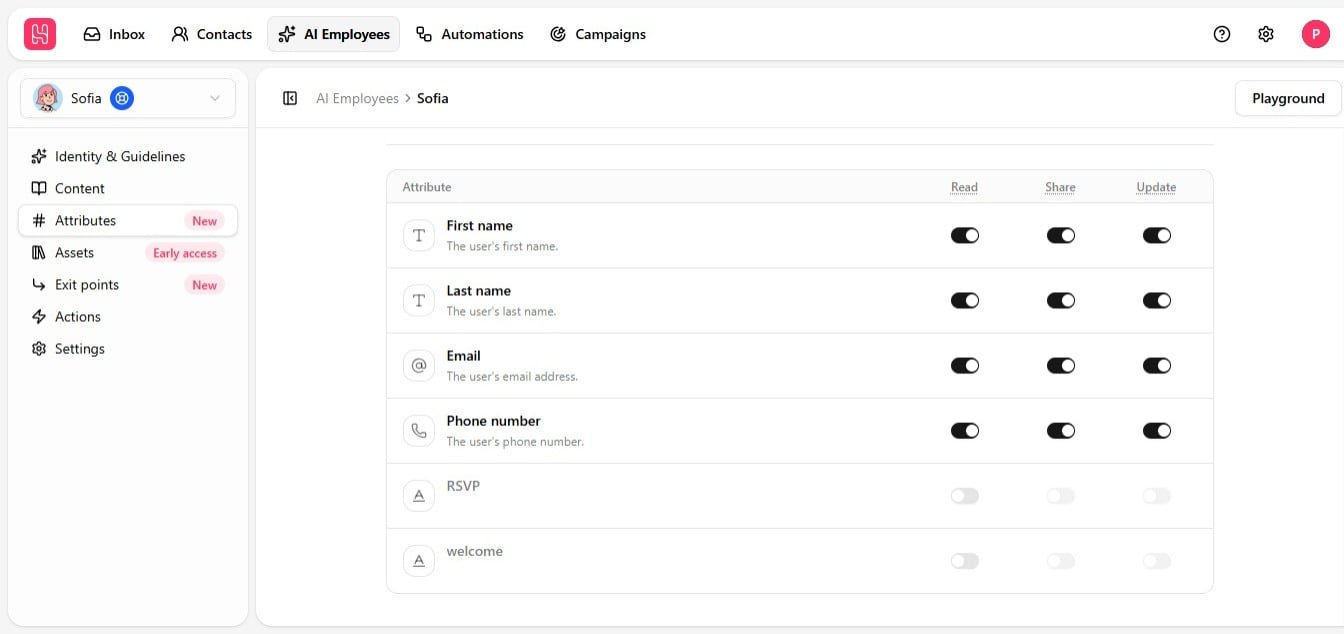 Read is required for the other two — you cannot turn on Share or Update without Read also being on. Toggle Read off, and the whole attribute switches off with it.
## Why Share matters for privacy
Say you track a contact's plan tier, lead status, or an internal pricing note as an attribute. You can leave **Read** on — so the employee can use that value in its own logic, deciding how to route a conversation, for example — while leaving **Share** off, so it never says the value out loud.
If a contact asks directly, "what plan am I on?", and Share is off, the employee says it does not have that information, even though it actually knows the value internally. That is by design — it protects sensitive data even when the contact already suspects the attribute exists and asks for it directly.
## What Update is for
Update lets the employee capture and save new information as the conversation happens — a name, an email, a phone number, or any custom attribute, saved straight to the contact record without anyone entering it manually later. This is what makes an employee genuinely useful for lead qualification, not just answering questions.
This is especially valuable on channels like Live Chat, where a visitor starts out anonymous. Give the employee Update access to name, email, and phone number, and it can turn an anonymous chat into a fully identified contact over the course of a conversation. See [Update contact fields](/help/ai-employees/capabilities/update-contact-fields).
## Setting this up
The four system attributes — first name, last name, email, and phone number — are enabled with Read by default. Add custom attributes from your workspace settings as needed, with a short description if the name alone is not self-explanatory; that description is what helps the employee understand when and how to use it.
| Role | Typical exposure |
| ----------- | -------------------------------------------------------------- |
| **Support** | Name, and any custom fields tied to the issue being resolved. |
| **Sales** | Contact details plus lead-status or qualification attributes. |
| **General** | Brand-safe defaults only — expand as the use case requires it. |
See [Read contact fields](/help/ai-employees/capabilities/read-contact-fields) and [Update contact fields](/help/ai-employees/capabilities/update-contact-fields) for step-by-step setup.
Read is required for the other two — you cannot turn on Share or Update without Read also being on. Toggle Read off, and the whole attribute switches off with it.
## Why Share matters for privacy
Say you track a contact's plan tier, lead status, or an internal pricing note as an attribute. You can leave **Read** on — so the employee can use that value in its own logic, deciding how to route a conversation, for example — while leaving **Share** off, so it never says the value out loud.
If a contact asks directly, "what plan am I on?", and Share is off, the employee says it does not have that information, even though it actually knows the value internally. That is by design — it protects sensitive data even when the contact already suspects the attribute exists and asks for it directly.
## What Update is for
Update lets the employee capture and save new information as the conversation happens — a name, an email, a phone number, or any custom attribute, saved straight to the contact record without anyone entering it manually later. This is what makes an employee genuinely useful for lead qualification, not just answering questions.
This is especially valuable on channels like Live Chat, where a visitor starts out anonymous. Give the employee Update access to name, email, and phone number, and it can turn an anonymous chat into a fully identified contact over the course of a conversation. See [Update contact fields](/help/ai-employees/capabilities/update-contact-fields).
## Setting this up
The four system attributes — first name, last name, email, and phone number — are enabled with Read by default. Add custom attributes from your workspace settings as needed, with a short description if the name alone is not self-explanatory; that description is what helps the employee understand when and how to use it.
| Role | Typical exposure |
| ----------- | -------------------------------------------------------------- |
| **Support** | Name, and any custom fields tied to the issue being resolved. |
| **Sales** | Contact details plus lead-status or qualification attributes. |
| **General** | Brand-safe defaults only — expand as the use case requires it. |
See [Read contact fields](/help/ai-employees/capabilities/read-contact-fields) and [Update contact fields](/help/ai-employees/capabilities/update-contact-fields) for step-by-step setup.