> ## Documentation Index
> Fetch the complete documentation index at: https://docs.heyy.io/llms.txt
> Use this file to discover all available pages before exploring further.
# Product updates
> Stay up to date with Heyy product updates, new features, improvements, and bug fixes.
PRODUCT UPDATES
June 2026
## AI Employee v2
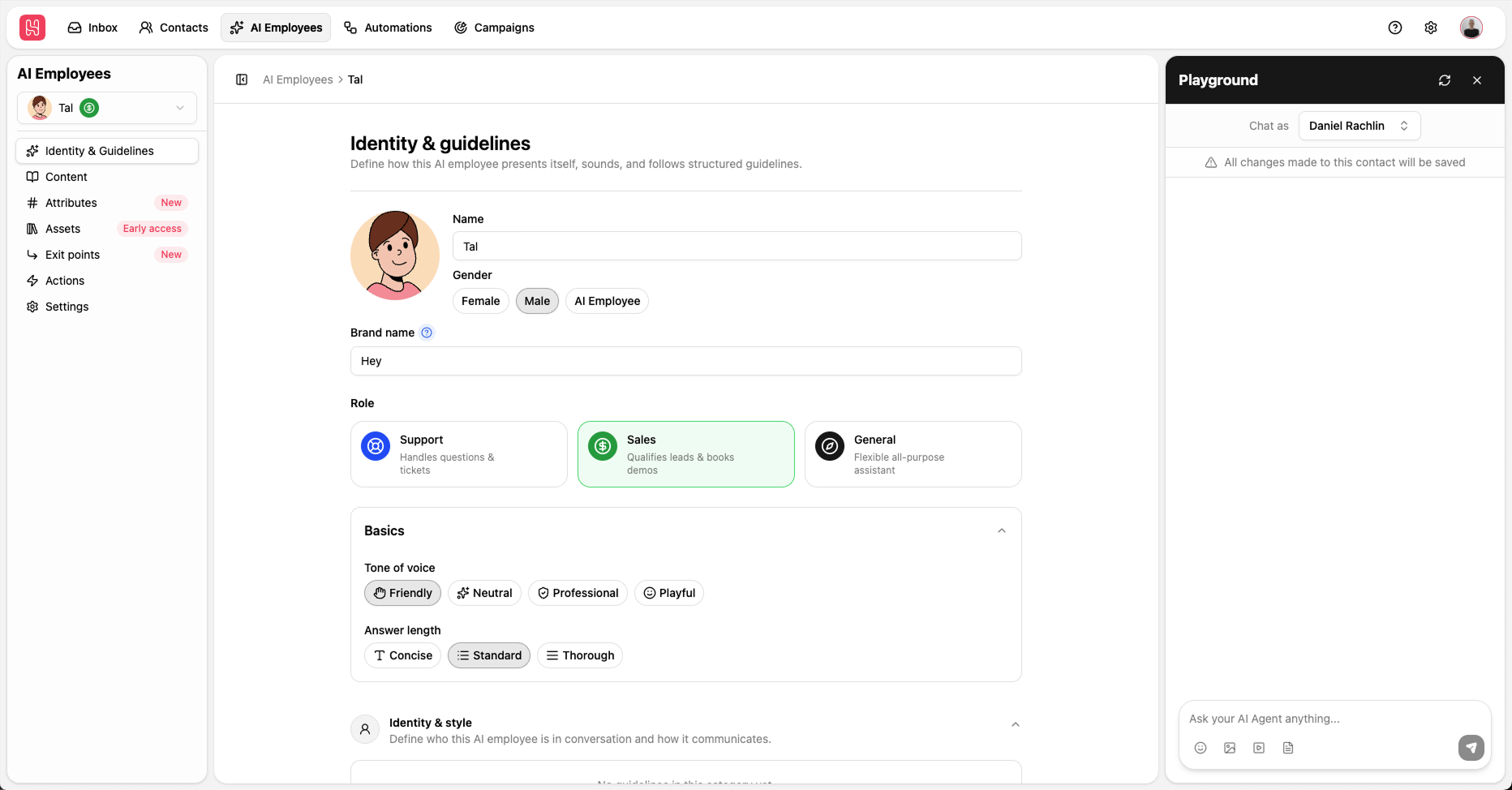 **AI Employee v2** is a redesigned way to set up your AI teammates: structured identity, guidelines by category, assets, and a new playground—instead of one big block of free-form instructions.
If you already have AI Employees, you can **migrate in one step** from the upgrade banner. Your current instructions are preserved in an **Other** guideline, so nothing gets lost while you move to the clearer v2 experience.
## URL buttons for WhatsApp, Instagram, and Facebook
**AI Employee v2** is a redesigned way to set up your AI teammates: structured identity, guidelines by category, assets, and a new playground—instead of one big block of free-form instructions.
If you already have AI Employees, you can **migrate in one step** from the upgrade banner. Your current instructions are preserved in an **Other** guideline, so nothing gets lost while you move to the clearer v2 experience.
## URL buttons for WhatsApp, Instagram, and Facebook
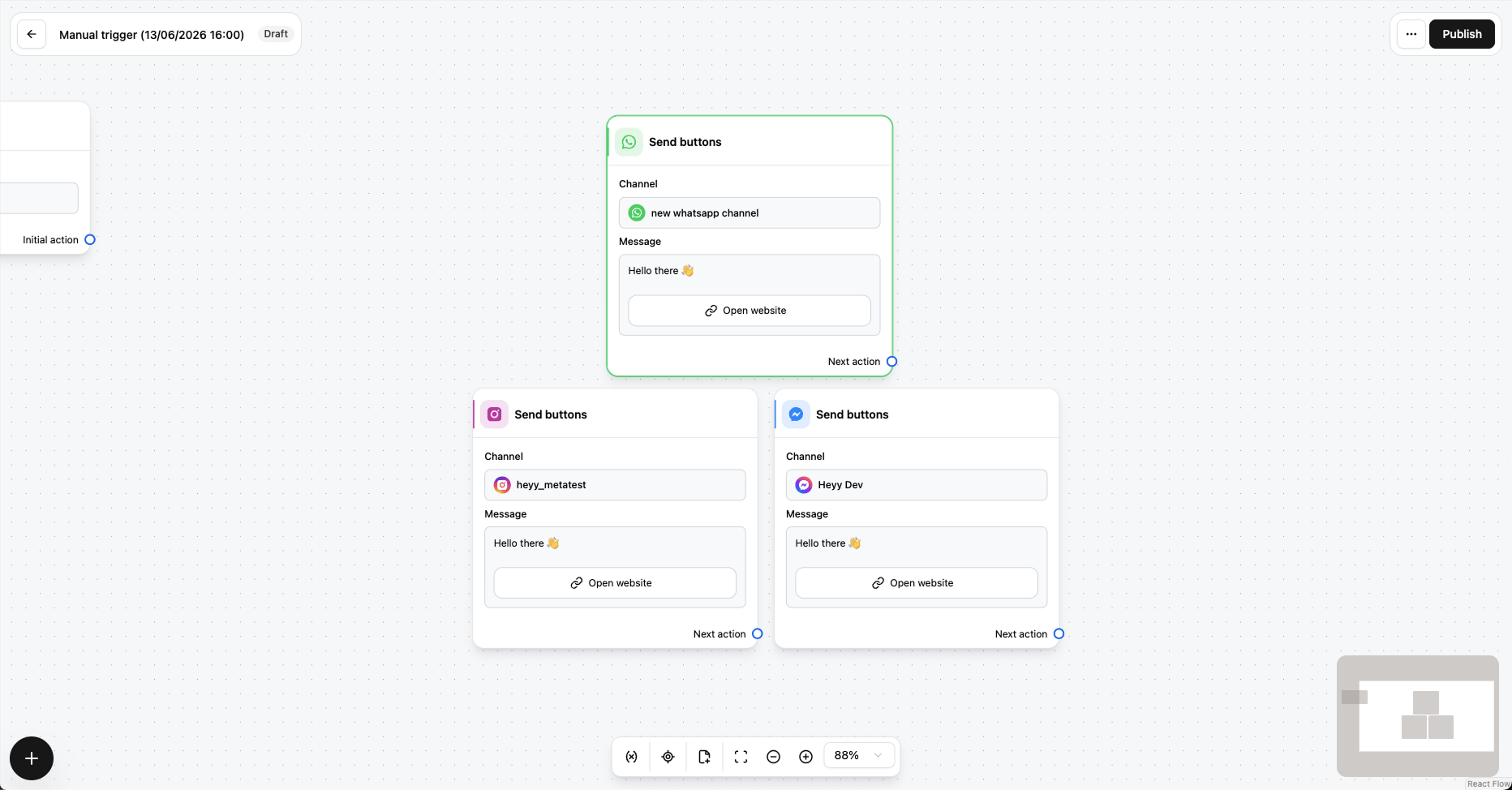 Automations can now send messages with **URL buttons** on **WhatsApp**, **Instagram**, and **Facebook Messenger**—alongside the quick replies you already use.
Customers tap a button and land on your link directly: booking pages, product URLs, landing pages, and more. No need to paste long links into the message body.
## Search by message content
Automations can now send messages with **URL buttons** on **WhatsApp**, **Instagram**, and **Facebook Messenger**—alongside the quick replies you already use.
Customers tap a button and land on your link directly: booking pages, product URLs, landing pages, and more. No need to paste long links into the message body.
## Search by message content
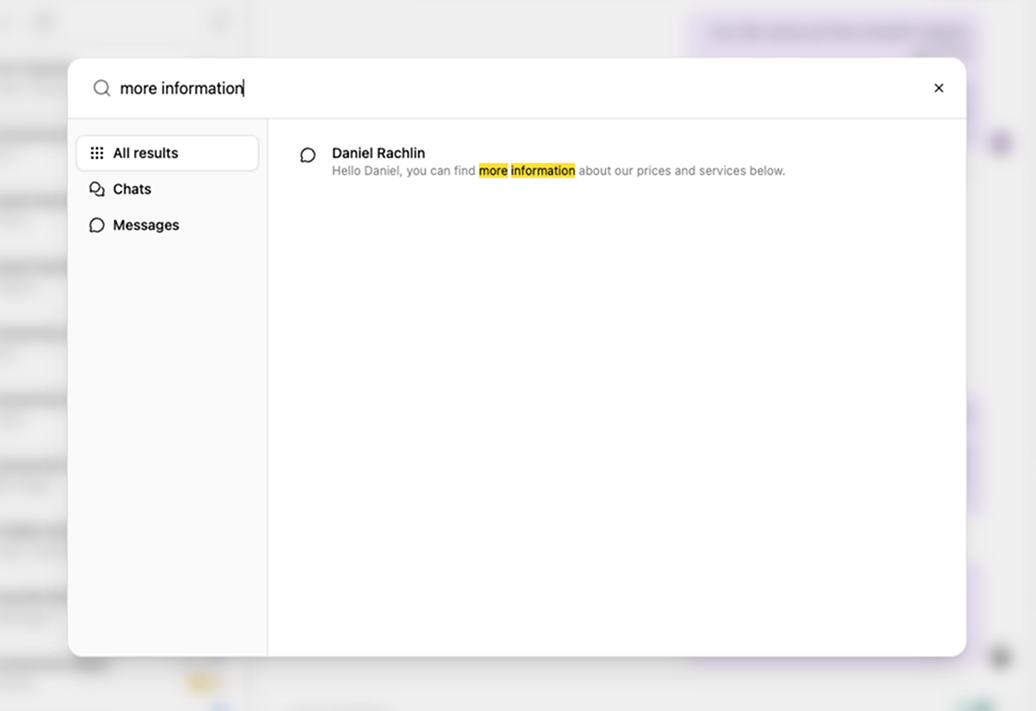 **Global search** now includes a **Messages** filter, so you can find conversations by what was actually said—not just contact name or phone number.
Open search from the Inbox sidebar, switch to Messages, and jump straight to the chat you need. Handy when you remember the wording but not who sent it.
## New Facebook comment trigger
**Global search** now includes a **Messages** filter, so you can find conversations by what was actually said—not just contact name or phone number.
Open search from the Inbox sidebar, switch to Messages, and jump straight to the chat you need. Handy when you remember the wording but not who sent it.
## New Facebook comment trigger
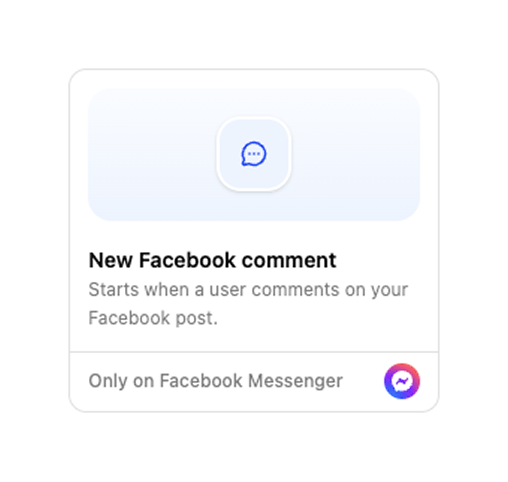 Automations can now start when someone **comments on a Facebook post**—the same idea as our Instagram comment trigger, now for Facebook too.
Choose **all posts** or **specific posts**, then build comment-to-DM flows, follow-ups, or routing logic from the automation editor you already know.
## Improved new chat dialog
Starting an outbound conversation is smoother with a redesigned **New chat** dialog: search for a contact by phone or email, **quick-add** someone new if they are not in Heyy yet, then pick the channel to send from.
Keyboard navigation and a clearer From/To layout mean fewer steps and less hunting—right from Inbox. See [Start a new chat](/help/inbox/start-a-new-chat).
## Saved inbox views
Build an advanced chat filter once, **save it as a view**, and return to it from the Inbox sidebar anytime—each view shows its own open and unread counts so workload is visible at a glance.
Perfect for VIP queues, channel-specific inboxes, or any slice of conversations your team checks often. See [Saved inbox views](/help/inbox/find-and-organize/saved-inbox-views).
## 2FA support for all users
**Two-factor authentication** is now available for every Heyy user—not just admins. Turn on TOTP from **Profile → Security** with your authenticator app for an extra layer of account protection.
Workspace members who need it will see verification at login. See [Security](/help/managing-your-profile/security).
Automations can now start when someone **comments on a Facebook post**—the same idea as our Instagram comment trigger, now for Facebook too.
Choose **all posts** or **specific posts**, then build comment-to-DM flows, follow-ups, or routing logic from the automation editor you already know.
## Improved new chat dialog
Starting an outbound conversation is smoother with a redesigned **New chat** dialog: search for a contact by phone or email, **quick-add** someone new if they are not in Heyy yet, then pick the channel to send from.
Keyboard navigation and a clearer From/To layout mean fewer steps and less hunting—right from Inbox. See [Start a new chat](/help/inbox/start-a-new-chat).
## Saved inbox views
Build an advanced chat filter once, **save it as a view**, and return to it from the Inbox sidebar anytime—each view shows its own open and unread counts so workload is visible at a glance.
Perfect for VIP queues, channel-specific inboxes, or any slice of conversations your team checks often. See [Saved inbox views](/help/inbox/find-and-organize/saved-inbox-views).
## 2FA support for all users
**Two-factor authentication** is now available for every Heyy user—not just admins. Turn on TOTP from **Profile → Security** with your authenticator app for an extra layer of account protection.
Workspace members who need it will see verification at login. See [Security](/help/managing-your-profile/security).
PRODUCT UPDATES
April 2026
## Webhook received trigger
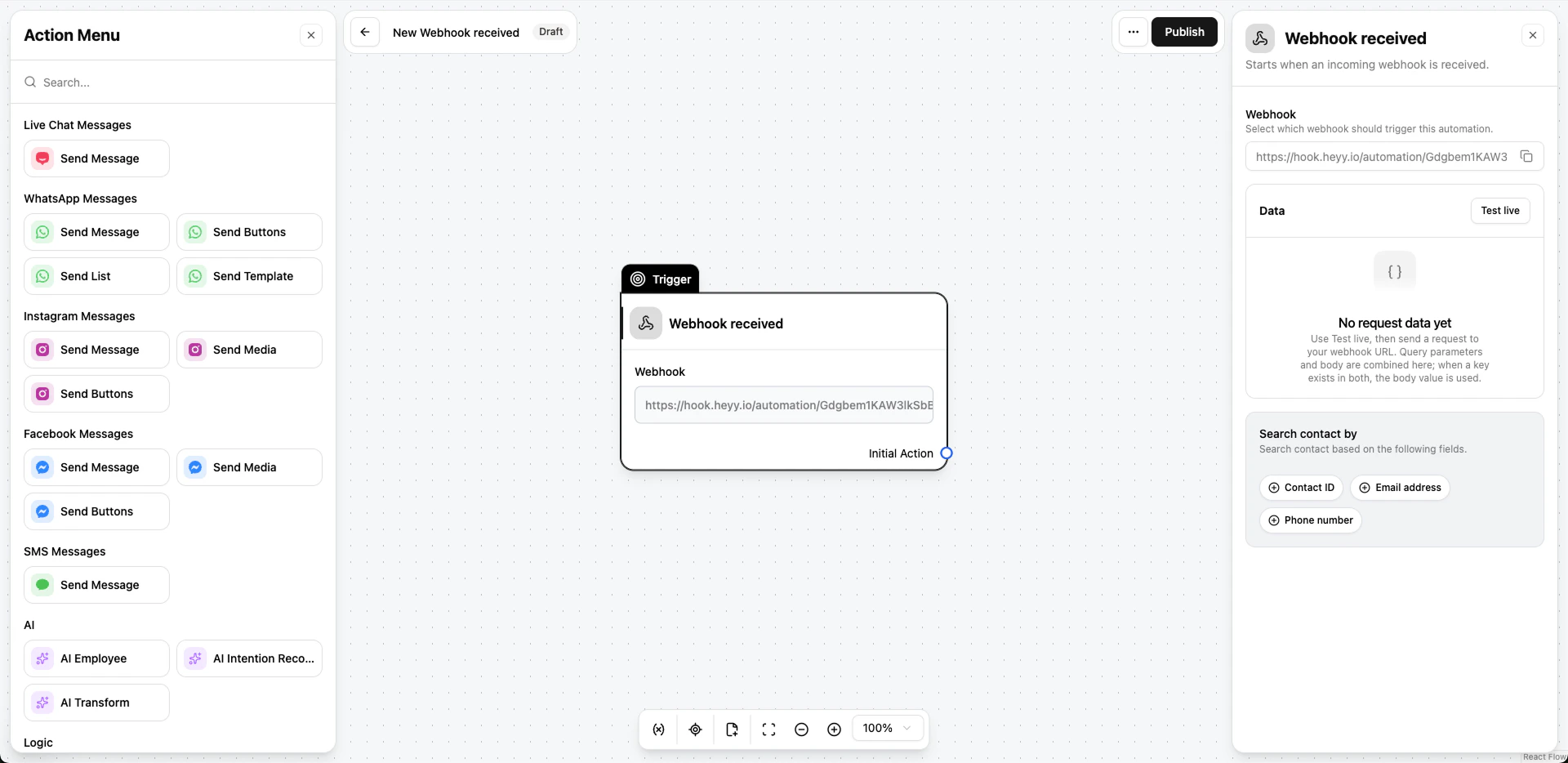 We added a **Webhook received** automation trigger. You can connect webhooks from any tool you use to Heyy and trigger an automation for your clients whenever those tools send an event, such as a booking confirmation, order-ready update etc'
That means you no longer need a separate integration layer like **Make**, **Zapier**, or **n8n** just to bridge a webhook into Heyy: connect the platform directly and keep the whole flow in one place.
## Journeys
We added a **Webhook received** automation trigger. You can connect webhooks from any tool you use to Heyy and trigger an automation for your clients whenever those tools send an event, such as a booking confirmation, order-ready update etc'
That means you no longer need a separate integration layer like **Make**, **Zapier**, or **n8n** just to bridge a webhook into Heyy: connect the platform directly and keep the whole flow in one place.
## Journeys
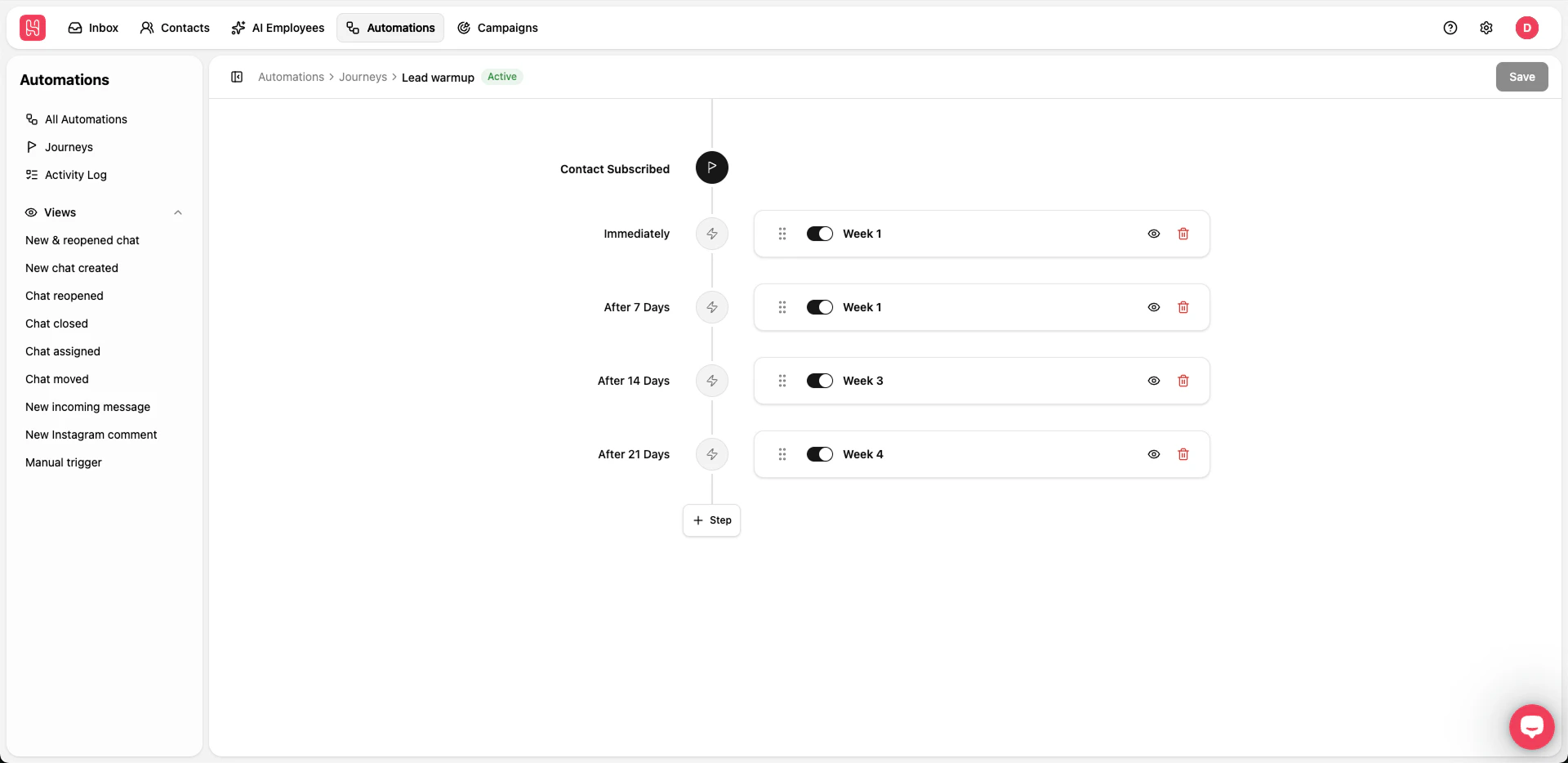 **Journeys** are timed paths for clients, leads, and customers: you **schedule steps** with waits between them, **each step runs an automation** so the sequence keeps moving on its own. Time them **from subscription** (day zero = when they join) or on **fixed calendar dates**, whether you’re warming leads or counting down to a launch.
PRODUCT UPDATES
March 2026
## New Manager role
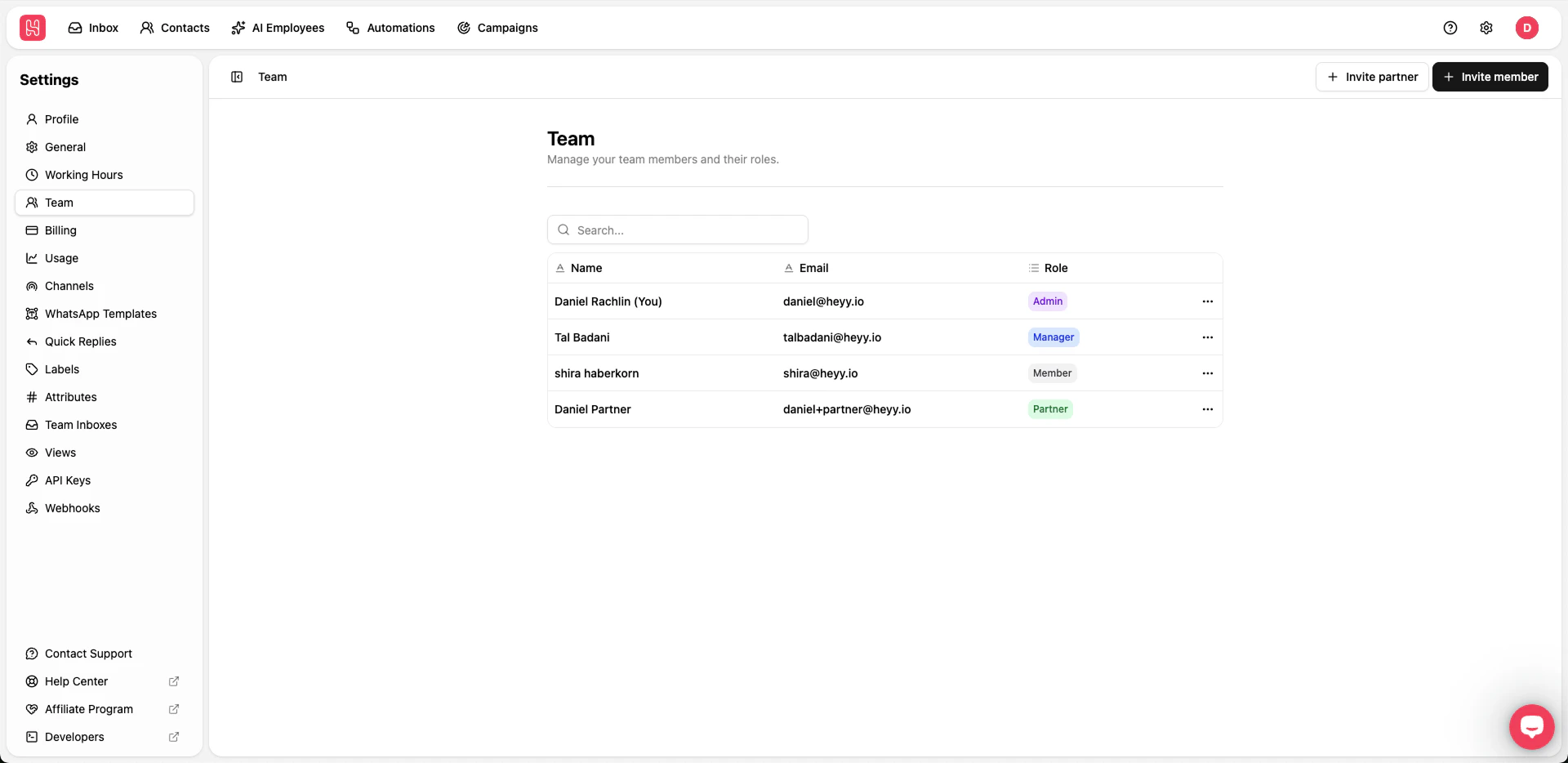 We added a **Manager** role that sits between **Member** and **Admin**, so you can give trusted people more room to run things without handing over the whole workspace.
That should make it simpler to grow your team and keep permissions sensible. Assign it when you invite or edit someone in [**Settings → Team**](https://app.heyy.io/settings/team). For the full permission breakdown, see the [permissions table](/help/managing-your-workspace/workspace-roles).
## Partner invite
We added a **Manager** role that sits between **Member** and **Admin**, so you can give trusted people more room to run things without handing over the whole workspace.
That should make it simpler to grow your team and keep permissions sensible. Assign it when you invite or edit someone in [**Settings → Team**](https://app.heyy.io/settings/team). For the full permission breakdown, see the [permissions table](/help/managing-your-workspace/workspace-roles).
## Partner invite
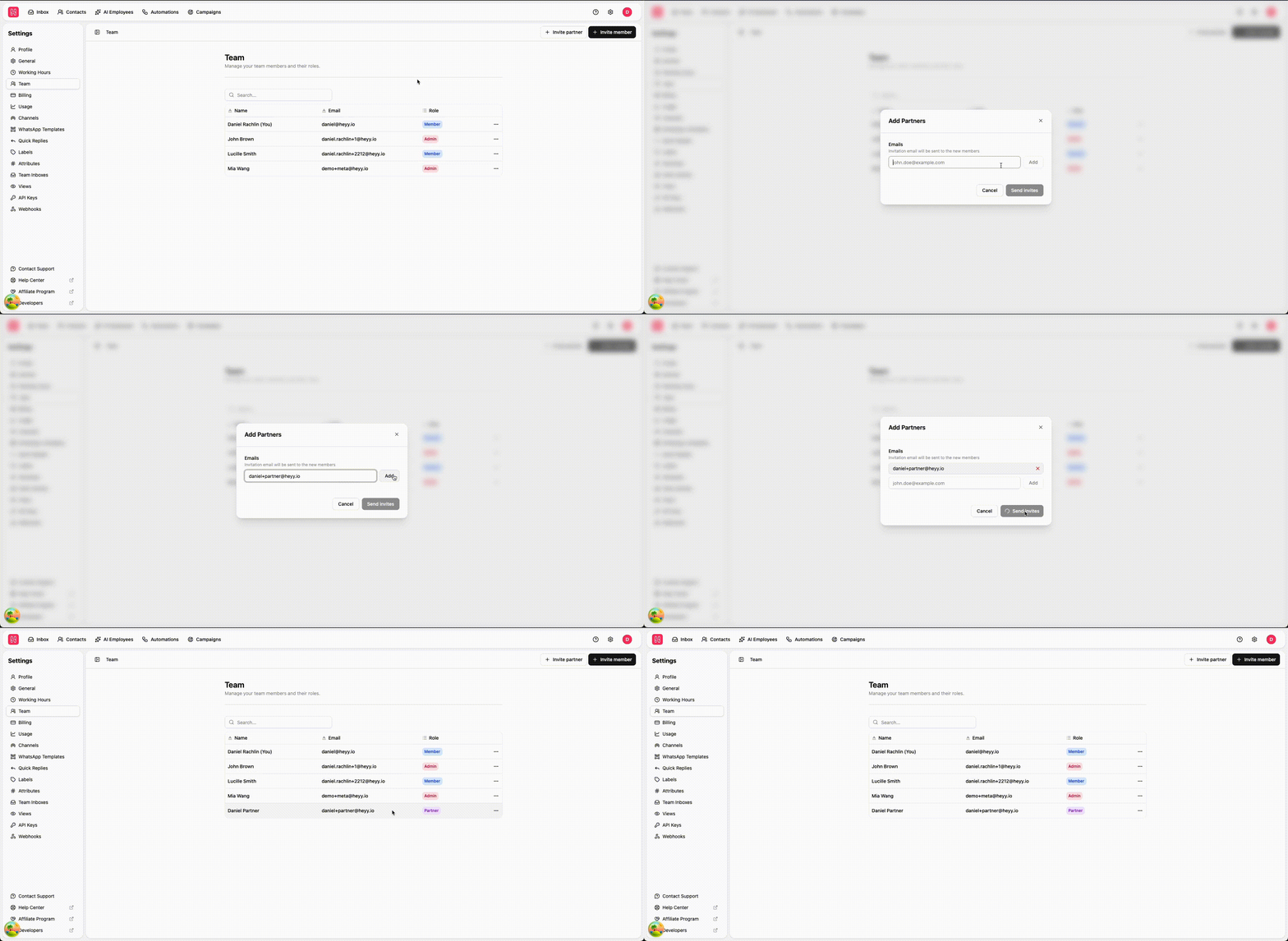 You can invite **Partner users** to work with your workspace in a dedicated way—without using up a seat from your main plan. That makes it simpler to collaborate with agencies, contractors, or other teammates who need access but shouldn’t count against your core team allocation.
If you’re unsure how Partner access fits your organization, your Heyy admin can review roles and invitations in workspace settings.
## Webhooks v2.0
You can invite **Partner users** to work with your workspace in a dedicated way—without using up a seat from your main plan. That makes it simpler to collaborate with agencies, contractors, or other teammates who need access but shouldn’t count against your core team allocation.
If you’re unsure how Partner access fits your organization, your Heyy admin can review roles and invitations in workspace settings.
## Webhooks v2.0
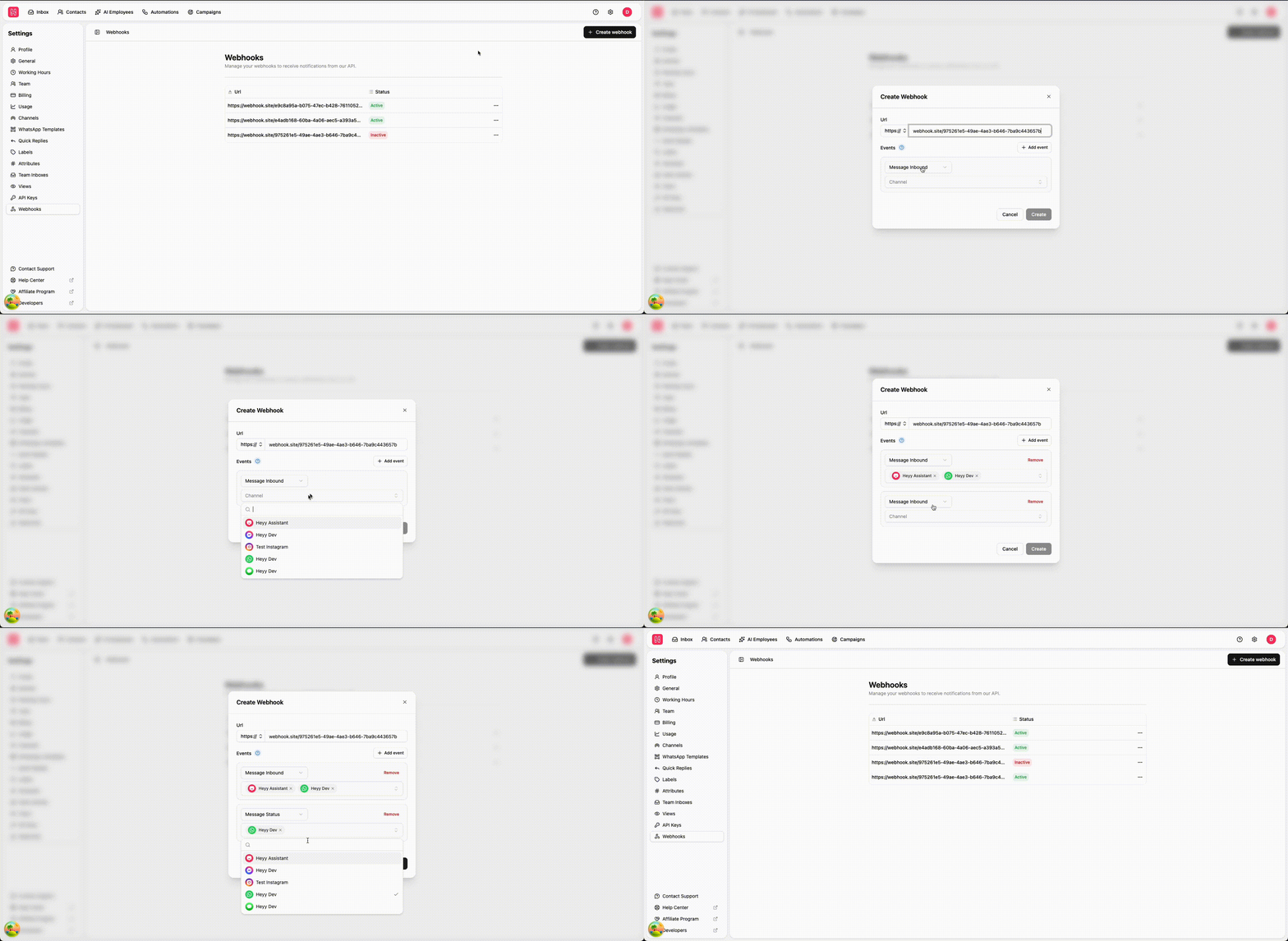 **Webhooks v2.0** lines up with our [API versioning](/api-reference/versioning) and a clearer [webhook payload model](/webhooks/event-types), so your integrations receive consistent, structured events as Heyy evolves.
If you connect Heyy to your own systems or data warehouse, this makes it easier to build reliable automations—treat unknown fields as optional, route on `event`, and upgrade on your timeline. For setup in the app, see [Webhooks](/webhooks/overview).
## New automation triggers
Automations can now start from more of what happens in your account—beyond chats alone. New triggers help you react when **contacts are created or updated**, when a **label is added**, or when a **label is removed**, so workflows stay in sync with your CRM-style data and team organization.
Together, these options reduce manual work: sync attributes, kick off follow-ups when a label changes, or keep downstream tools updated automatically. Browse all triggers in [Triggers](/help/automations/triggers/overview).
## AI Employees can wait for multiple messages before replying
AI Employees can now **collect more than one customer message** before sending a reply—helpful when people send several short lines in a row or when you want the model to see the full thought before responding.
That leads to more natural conversations and fewer premature answers, especially in fast-moving chats. Configure this behavior where you set up your AI Employee in [AI Employees](/help/ai-employees/index).
## AI Employees can now read all media attachments
AI Employees can **use what’s inside media attachments**—not just the text around them—so replies can reflect images, documents, and other files customers share.
Whether someone sends a screenshot, a photo, or a PDF, your AI Employee has more context to help accurately. This pairs with how you already train employees in [AI Employees](/help/ai-employees/index).
## New Automation editor UI
**Webhooks v2.0** lines up with our [API versioning](/api-reference/versioning) and a clearer [webhook payload model](/webhooks/event-types), so your integrations receive consistent, structured events as Heyy evolves.
If you connect Heyy to your own systems or data warehouse, this makes it easier to build reliable automations—treat unknown fields as optional, route on `event`, and upgrade on your timeline. For setup in the app, see [Webhooks](/webhooks/overview).
## New automation triggers
Automations can now start from more of what happens in your account—beyond chats alone. New triggers help you react when **contacts are created or updated**, when a **label is added**, or when a **label is removed**, so workflows stay in sync with your CRM-style data and team organization.
Together, these options reduce manual work: sync attributes, kick off follow-ups when a label changes, or keep downstream tools updated automatically. Browse all triggers in [Triggers](/help/automations/triggers/overview).
## AI Employees can wait for multiple messages before replying
AI Employees can now **collect more than one customer message** before sending a reply—helpful when people send several short lines in a row or when you want the model to see the full thought before responding.
That leads to more natural conversations and fewer premature answers, especially in fast-moving chats. Configure this behavior where you set up your AI Employee in [AI Employees](/help/ai-employees/index).
## AI Employees can now read all media attachments
AI Employees can **use what’s inside media attachments**—not just the text around them—so replies can reflect images, documents, and other files customers share.
Whether someone sends a screenshot, a photo, or a PDF, your AI Employee has more context to help accurately. This pairs with how you already train employees in [AI Employees](/help/ai-employees/index).
## New Automation editor UI
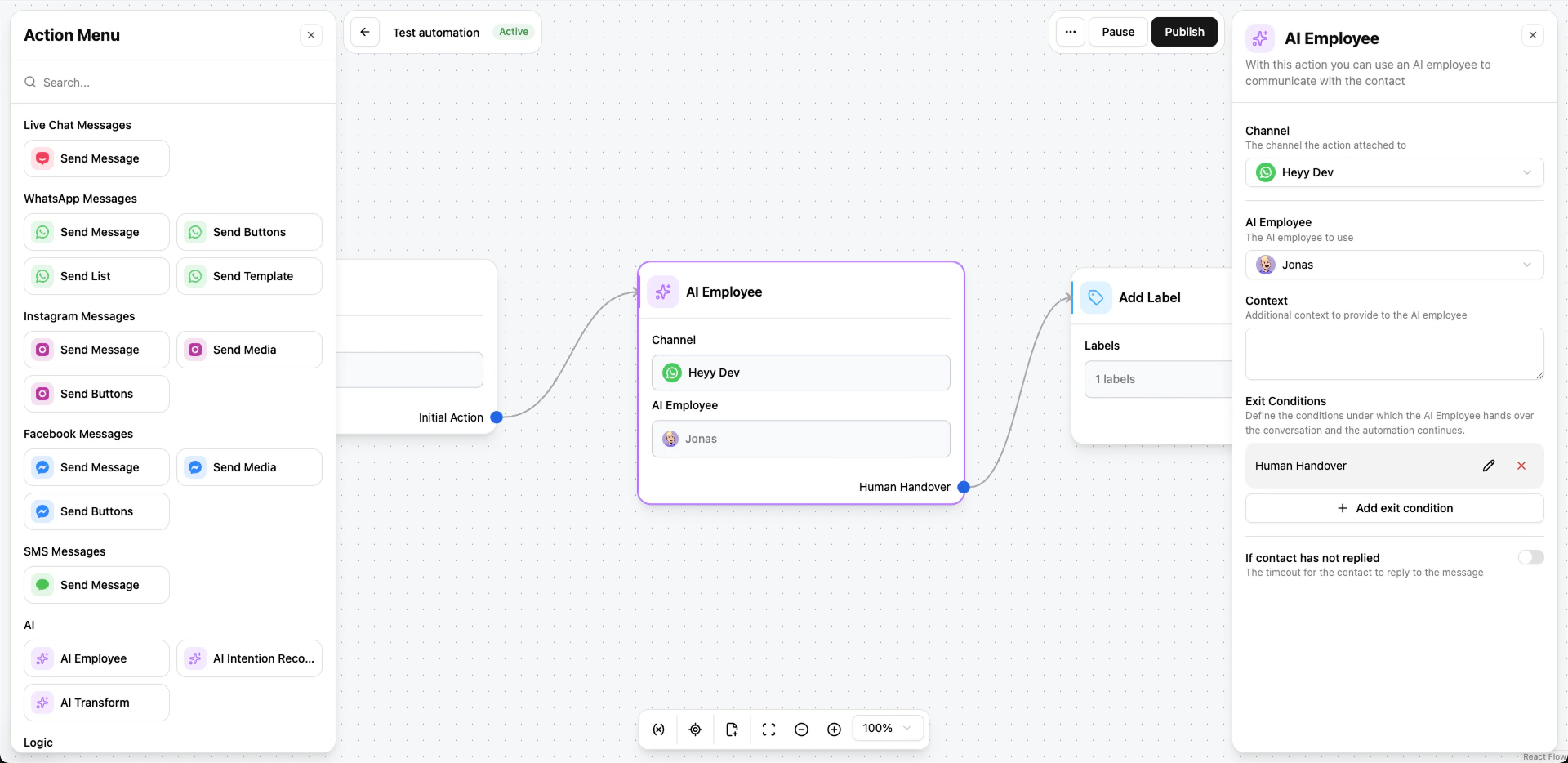 The **automation editor** has a fresh interface that’s easier to scan and build with: clearer layout, smoother editing, and a more predictable flow from trigger to actions.
If you live in automations every day, you should spend less time navigating the canvas and more time shipping the logic your customers need. Open any automation to try the new experience; behavior stays familiar, with a cleaner workspace.
The **automation editor** has a fresh interface that’s easier to scan and build with: clearer layout, smoother editing, and a more predictable flow from trigger to actions.
If you live in automations every day, you should spend less time navigating the canvas and more time shipping the logic your customers need. Open any automation to try the new experience; behavior stays familiar, with a cleaner workspace.
PRODUCT UPDATES
February 2026
## Automation versions
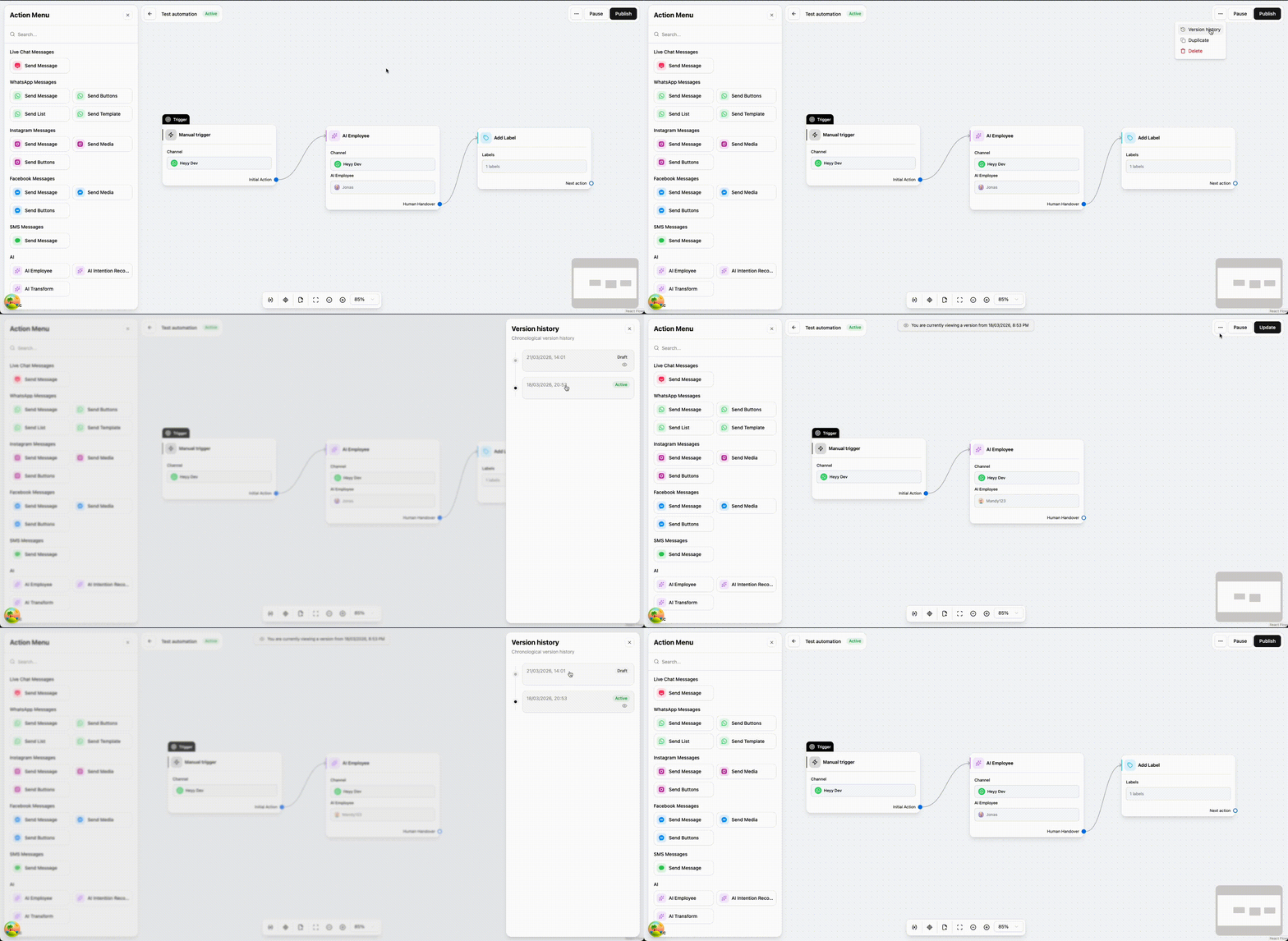 Automations now keep a **version history**, so you can see how a workflow changed over time and work with more confidence when you edit live flows.
That makes it easier to iterate safely: understand what changed, roll back if something doesn’t behave as expected, and keep your team aligned on which version is running in production.
## Clearer WhatsApp template errors and guidance
Heyy now **won’t let you submit** a WhatsApp template until **every validation issue is fixed**. You see what’s wrong up front and resolve it in the editor—instead of sending something to Meta and waiting, only to get a frustrating rejection.
That saves your team real time and cuts down on those slow, annoying review cycles. You still get **clear guidance** as you build (structure, buttons, and what usually passes). For more on templates in Heyy, see [WhatsApp templates](/help/messaging-channels/whatsapp/whatsapp-templates).
## AI knowledge base automatic retraining
We removed the need to **manually retrain** your AI Employees. The knowledge base now **updates on its own every few minutes**, so your sources stay in sync without an extra button to remember.
That’s a smoother experience for your team and a more reliable one for customers: answers reflect what you’ve added or changed recently, not the last time someone kicked off a training job. Add and edit knowledge as usual on [AI Employees](/help/ai-employees/index)—Heyy keeps the rest up to date in the background.
## New AI knowledge source types: Q\&A and documents
You can now train AI Employees using **structured Q\&A** and **uploaded documents**, alongside the website links and free text you already use. That’s ideal for FAQs, policies, and files that don’t live on a public page.
Together, these sources help the AI pull answers from the material your team trusts most—whether it’s a short Q\&A pair or a full PDF. Learn more about building knowledge in [AI Employees](/help/ai-employees/index#knowledge-tab).
## Export campaign results
You can **export** campaign execution data for reporting, sharing with your team, or analyzing results in your own tools.
Whether you’re reviewing delivery, engagement, or follow-ups, exporting makes it easier to work with campaign outcomes outside Heyy—without copying numbers by hand.
## Contacts bulk actions
On the [Contacts](/help/contacts/index) page, you can now select **multiple contacts at once** and apply actions to the whole group—so repetitive updates take a few clicks instead of one-by-one edits. See [Bulk actions](/help/contacts/search-and-filters/bulk-actions).
It’s built for everyday cleanup and segmentation: keep your list accurate faster when you need the same change across many people.
## Inbox bulk actions
In [Inbox](/help/inbox/find-and-organize/bulk-actions), select several chats and use the **bulk action bar** to triage at scale—open, close, snooze, assign, move between team inboxes, and more.
It’s the same workflow you already use for one chat, now built for busy queues: clear backlog faster and keep routing consistent across your team.
Automations now keep a **version history**, so you can see how a workflow changed over time and work with more confidence when you edit live flows.
That makes it easier to iterate safely: understand what changed, roll back if something doesn’t behave as expected, and keep your team aligned on which version is running in production.
## Clearer WhatsApp template errors and guidance
Heyy now **won’t let you submit** a WhatsApp template until **every validation issue is fixed**. You see what’s wrong up front and resolve it in the editor—instead of sending something to Meta and waiting, only to get a frustrating rejection.
That saves your team real time and cuts down on those slow, annoying review cycles. You still get **clear guidance** as you build (structure, buttons, and what usually passes). For more on templates in Heyy, see [WhatsApp templates](/help/messaging-channels/whatsapp/whatsapp-templates).
## AI knowledge base automatic retraining
We removed the need to **manually retrain** your AI Employees. The knowledge base now **updates on its own every few minutes**, so your sources stay in sync without an extra button to remember.
That’s a smoother experience for your team and a more reliable one for customers: answers reflect what you’ve added or changed recently, not the last time someone kicked off a training job. Add and edit knowledge as usual on [AI Employees](/help/ai-employees/index)—Heyy keeps the rest up to date in the background.
## New AI knowledge source types: Q\&A and documents
You can now train AI Employees using **structured Q\&A** and **uploaded documents**, alongside the website links and free text you already use. That’s ideal for FAQs, policies, and files that don’t live on a public page.
Together, these sources help the AI pull answers from the material your team trusts most—whether it’s a short Q\&A pair or a full PDF. Learn more about building knowledge in [AI Employees](/help/ai-employees/index#knowledge-tab).
## Export campaign results
You can **export** campaign execution data for reporting, sharing with your team, or analyzing results in your own tools.
Whether you’re reviewing delivery, engagement, or follow-ups, exporting makes it easier to work with campaign outcomes outside Heyy—without copying numbers by hand.
## Contacts bulk actions
On the [Contacts](/help/contacts/index) page, you can now select **multiple contacts at once** and apply actions to the whole group—so repetitive updates take a few clicks instead of one-by-one edits. See [Bulk actions](/help/contacts/search-and-filters/bulk-actions).
It’s built for everyday cleanup and segmentation: keep your list accurate faster when you need the same change across many people.
## Inbox bulk actions
In [Inbox](/help/inbox/find-and-organize/bulk-actions), select several chats and use the **bulk action bar** to triage at scale—open, close, snooze, assign, move between team inboxes, and more.
It’s the same workflow you already use for one chat, now built for busy queues: clear backlog faster and keep routing consistent across your team.
PRODUCT UPDATES
January 2026
## Campaign bulk actions
From the campaign execution page, you can now take bulk actions on your results—update contact attributes for many people at once, right where you’re already reviewing who was reached and who wasn’t.
You can also spin up a new campaign in just a few clicks from the same screen. That’s especially handy when you want a follow-up for everyone who had a **failed** message: fix the issue, then quickly target that group with a fresh send without rebuilding your audience from scratch.
## SMS is here (via Twilio)
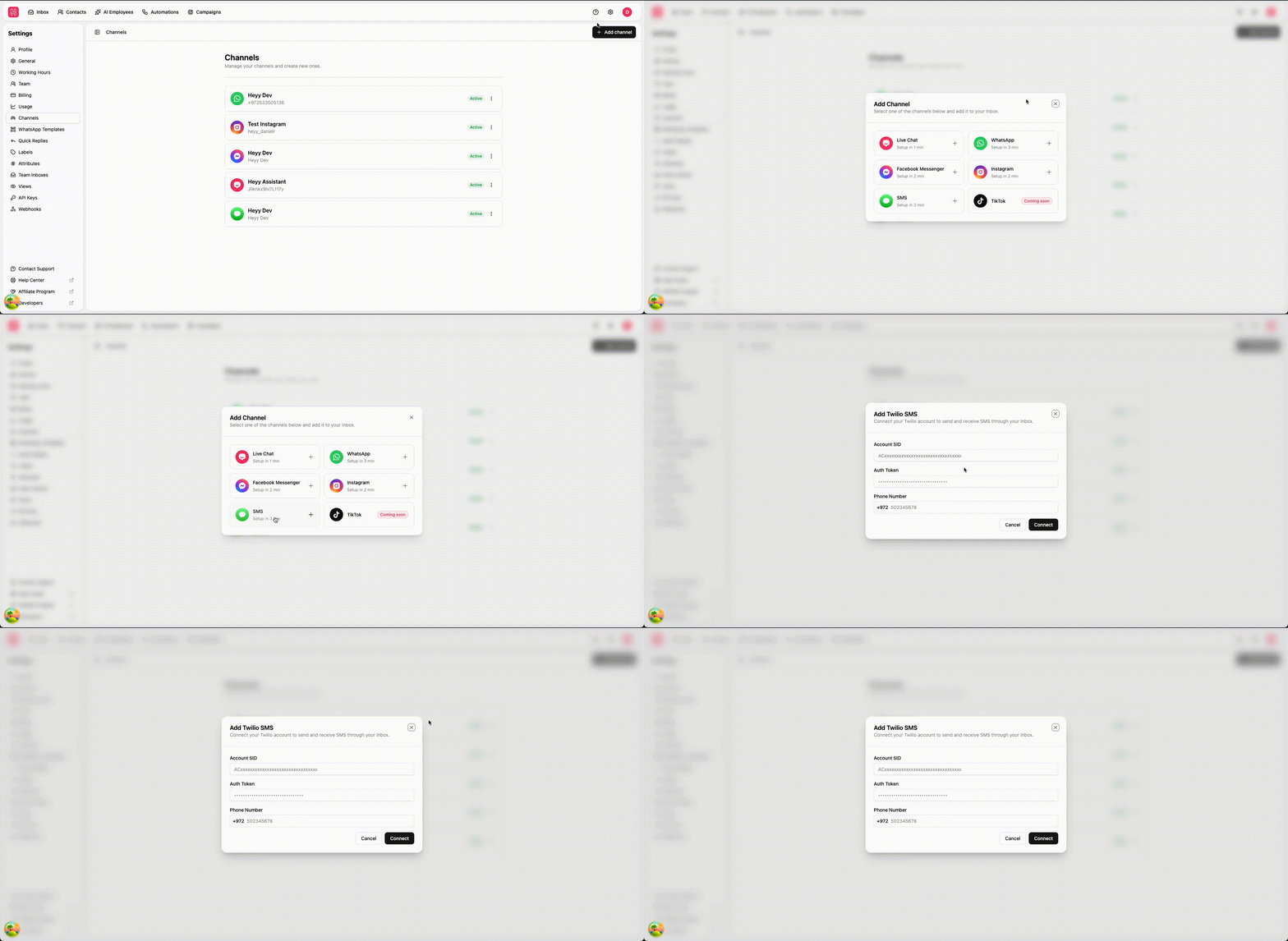 We heard you—and we’ve added the long-awaited **SMS** channel so you can reach customers by text alongside WhatsApp, Instagram, and the rest of your Heyy workspace. Connect it through Twilio and start handling SMS conversations in the same Inbox you already use every day.
Whether you use SMS for reminders, follow-ups, or two-way support, your team gets one place to reply, assign, and track chats without jumping between tools.
## Live chat now supports media
We heard you—and we’ve added the long-awaited **SMS** channel so you can reach customers by text alongside WhatsApp, Instagram, and the rest of your Heyy workspace. Connect it through Twilio and start handling SMS conversations in the same Inbox you already use every day.
Whether you use SMS for reminders, follow-ups, or two-way support, your team gets one place to reply, assign, and track chats without jumping between tools.
## Live chat now supports media
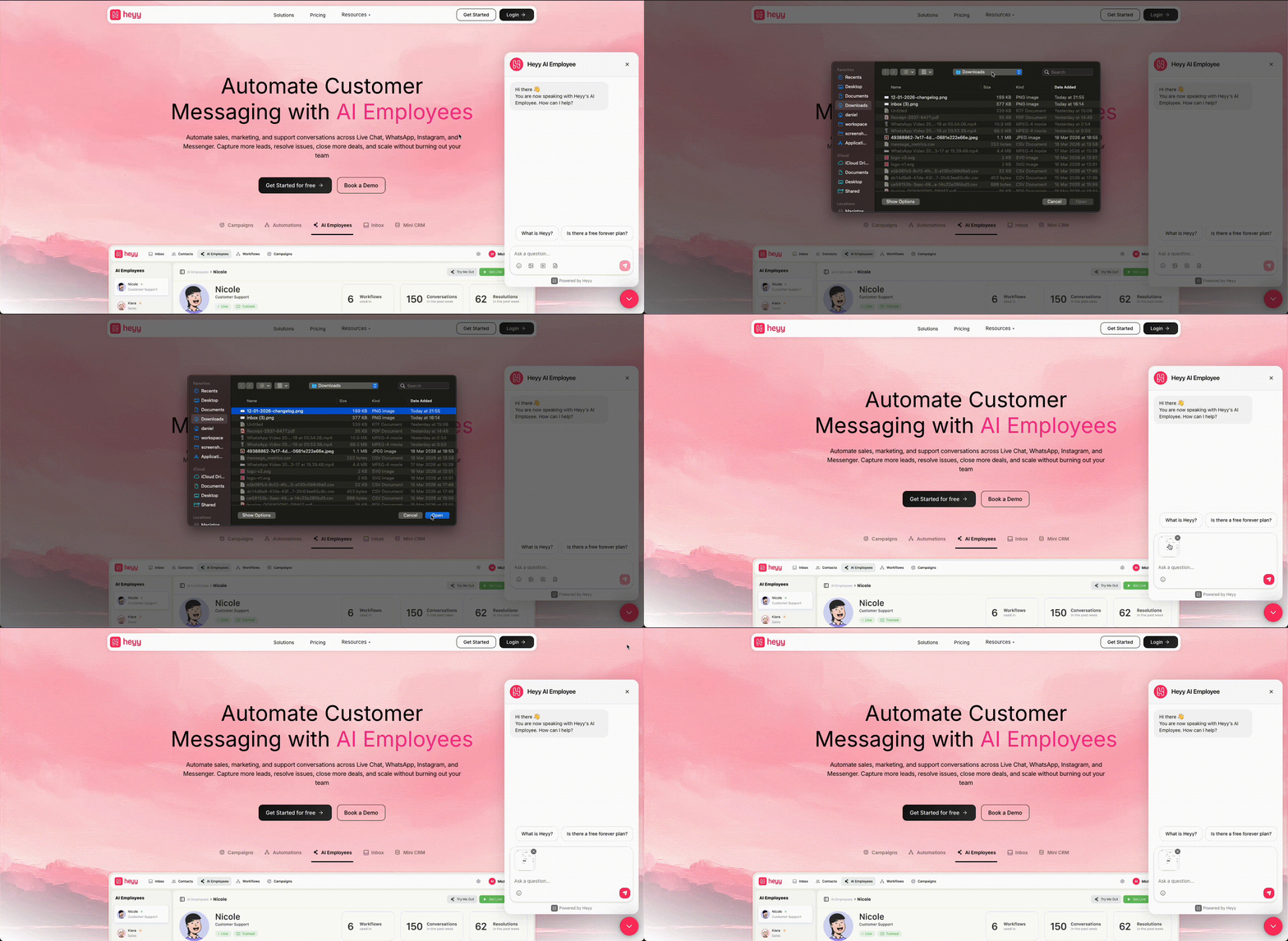 Live chat conversations in Heyy can now include more than text. Your team and your website visitors can send and receive images and files right inside the same Inbox thread—so screenshots, documents, and other attachments work the way people expect in a modern chat.
That means faster troubleshooting, clearer context, and fewer “can you email that?” moments. Everything stays in one conversation history, making follow-ups and handoffs easier for your team.
## New guided onboarding in Inbox
Live chat conversations in Heyy can now include more than text. Your team and your website visitors can send and receive images and files right inside the same Inbox thread—so screenshots, documents, and other attachments work the way people expect in a modern chat.
That means faster troubleshooting, clearer context, and fewer “can you email that?” moments. Everything stays in one conversation history, making follow-ups and handoffs easier for your team.
## New guided onboarding in Inbox
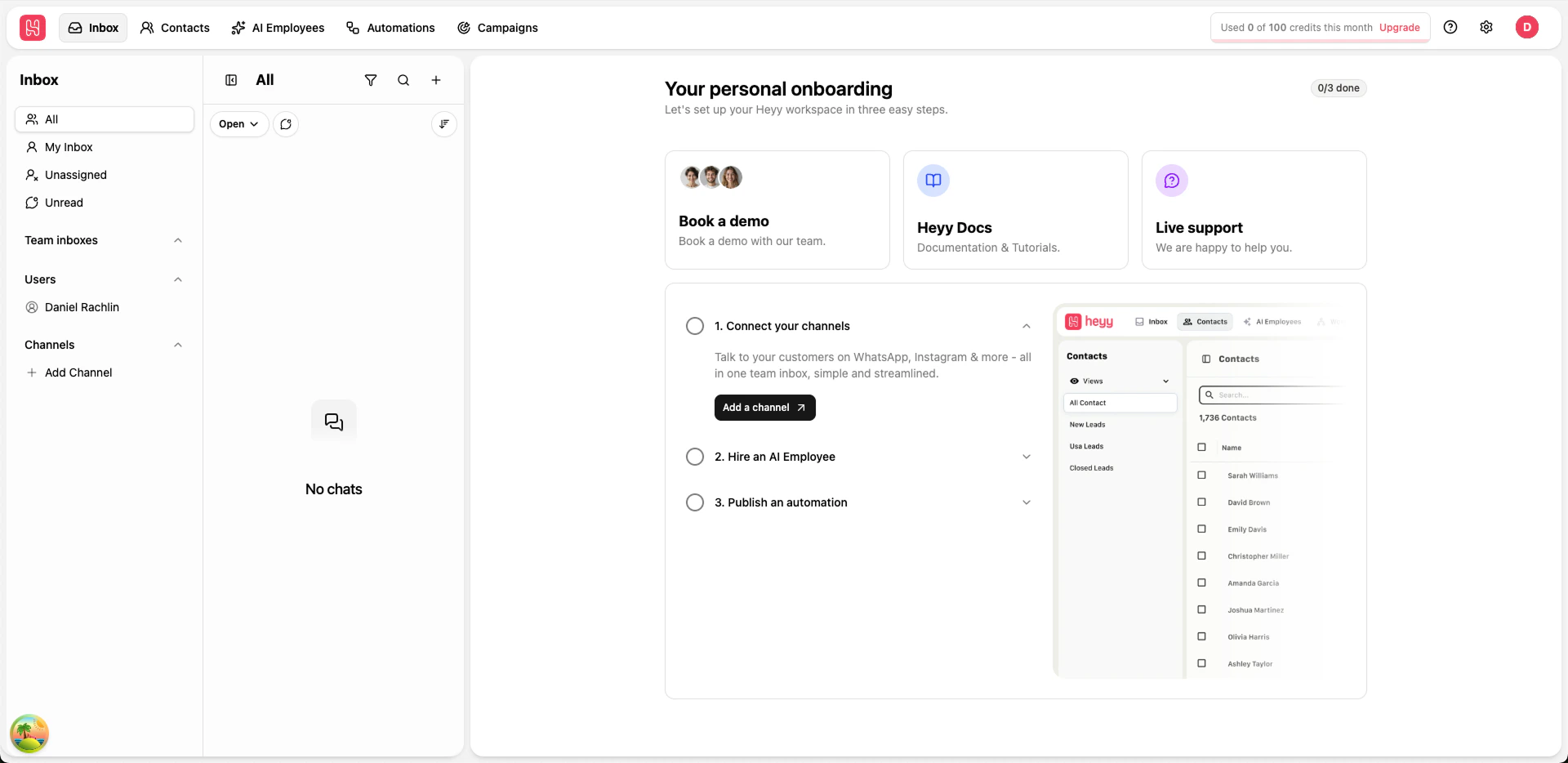 Starting from scratch is now much easier. When your workspace is new, Inbox now shows a clear onboarding checklist that guides you through the most important setup steps in the right order.
This helps your team get value faster without guessing what to do next. Instead of hunting through settings, you can follow each step directly from Inbox and move from setup to first conversations with more confidence.
## Duplicate WhatsApp templates in one click
You can now duplicate existing WhatsApp templates to create new versions faster. This makes it easier to reuse proven message structures, adjust wording for new campaigns, and launch updates without rebuilding templates from scratch.
## Drag and drop files in Inbox chat
You can now drag and drop files directly into an Inbox conversation to upload and send them faster. Images, videos, and documents are all supported, making it easier to share what you need without extra clicks.
## New triggers released
New automations are easier to set up the way you work. We listened to customer feedback and split the older “New & reopened chat” trigger into two clearer options—one for first-time conversations and one for returning customers. We also added a dedicated “Chat moved” trigger for when routing changes.
* **[New incoming chat](/help/automations/triggers/new-incoming-chat)**: starts when someone messages you for the first time and a brand-new conversation is created. Use this for true onboarding moments like first greetings, collecting basic details, or starting the right welcome flow without mixing in returning customers.
* **[Reopened chat](/help/automations/triggers/reopened-chat)**: starts when a previously closed conversation gets a new message. Use this for “welcome back” moments, re-assigning or routing returning chats, or triggering a different flow so you don’t repeat the same first-time welcome every time.
* **[Chat moved](/help/automations/triggers/chat-moved)**: starts when a chat is moved into one of your selected inboxes. Use this to react to routing decisions—like notifying the right team, kicking off a new checklist, or updating what happens next based on where the chat landed.
## A full UI + UX update
Starting from scratch is now much easier. When your workspace is new, Inbox now shows a clear onboarding checklist that guides you through the most important setup steps in the right order.
This helps your team get value faster without guessing what to do next. Instead of hunting through settings, you can follow each step directly from Inbox and move from setup to first conversations with more confidence.
## Duplicate WhatsApp templates in one click
You can now duplicate existing WhatsApp templates to create new versions faster. This makes it easier to reuse proven message structures, adjust wording for new campaigns, and launch updates without rebuilding templates from scratch.
## Drag and drop files in Inbox chat
You can now drag and drop files directly into an Inbox conversation to upload and send them faster. Images, videos, and documents are all supported, making it easier to share what you need without extra clicks.
## New triggers released
New automations are easier to set up the way you work. We listened to customer feedback and split the older “New & reopened chat” trigger into two clearer options—one for first-time conversations and one for returning customers. We also added a dedicated “Chat moved” trigger for when routing changes.
* **[New incoming chat](/help/automations/triggers/new-incoming-chat)**: starts when someone messages you for the first time and a brand-new conversation is created. Use this for true onboarding moments like first greetings, collecting basic details, or starting the right welcome flow without mixing in returning customers.
* **[Reopened chat](/help/automations/triggers/reopened-chat)**: starts when a previously closed conversation gets a new message. Use this for “welcome back” moments, re-assigning or routing returning chats, or triggering a different flow so you don’t repeat the same first-time welcome every time.
* **[Chat moved](/help/automations/triggers/chat-moved)**: starts when a chat is moved into one of your selected inboxes. Use this to react to routing decisions—like notifying the right team, kicking off a new checklist, or updating what happens next based on where the chat landed.
## A full UI + UX update
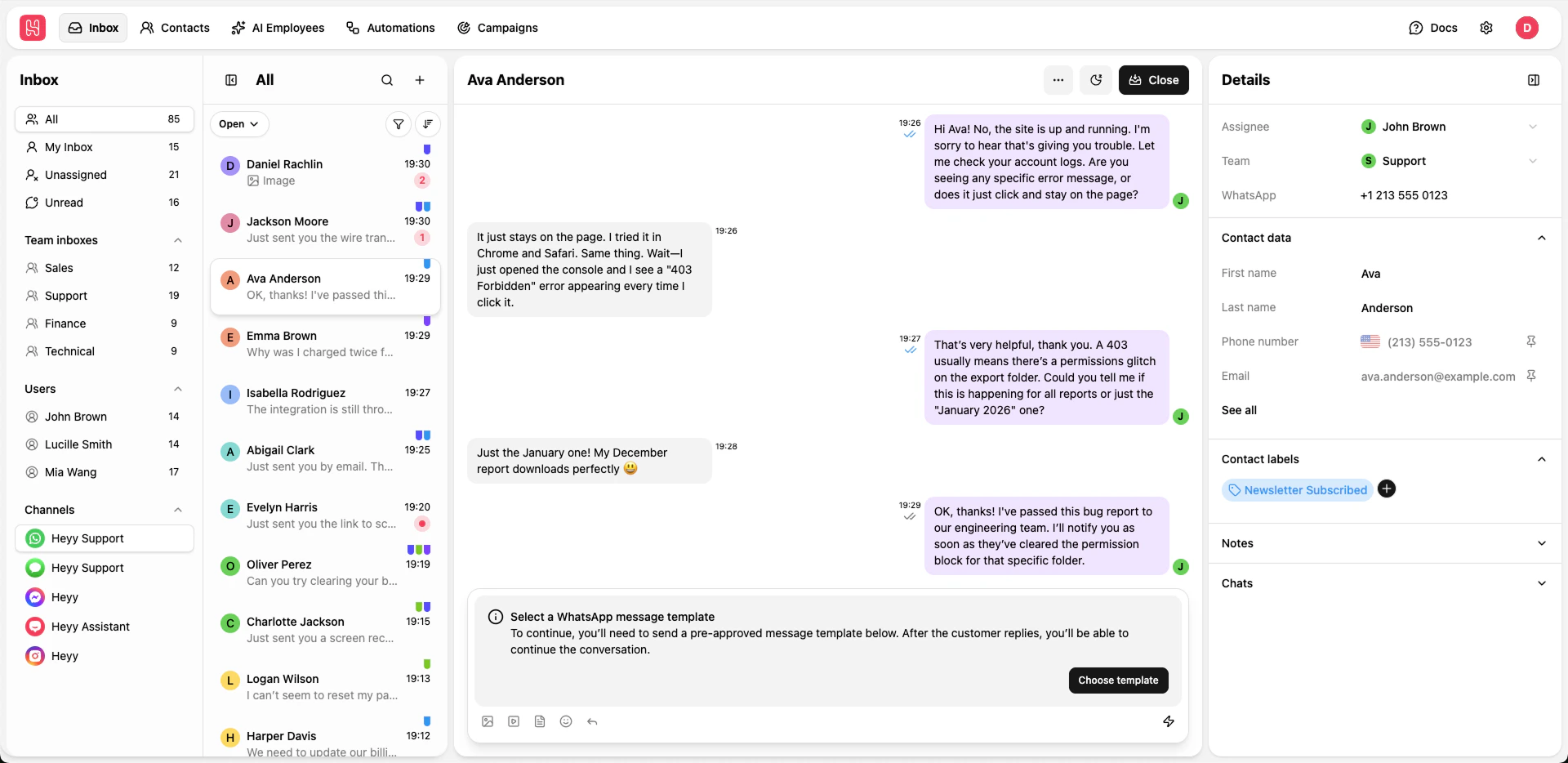 We listened closely to what customers told us about the experience—what felt confusing, what took too many steps, and what would make everyday work smoother. That feedback guided a full UI + UX refresh, designed around how you actually use Heyy day to day.
We rebuilt the core experience to feel clearer, more consistent, and easier to navigate. Screens now work together more naturally, so you spend less time finding things and more time getting results. We also paid extra attention to the small moments that add up: cleaner layouts, friendlier guidance, and interactions that feel natural instead of frustrating.
We listened closely to what customers told us about the experience—what felt confusing, what took too many steps, and what would make everyday work smoother. That feedback guided a full UI + UX refresh, designed around how you actually use Heyy day to day.
We rebuilt the core experience to feel clearer, more consistent, and easier to navigate. Screens now work together more naturally, so you spend less time finding things and more time getting results. We also paid extra attention to the small moments that add up: cleaner layouts, friendlier guidance, and interactions that feel natural instead of frustrating.